Migration Setup - myReadyPay to EarnIn Work Hub
This article provides instructions for adding the applicable system and client settings so employees migrate to the EarnIn Work Hub from myReadyPay. The company setting allows service bureaus to control the volume of employees migrating to EarnIn (based on the features being released over time and to control the volume of service bureau support inquiries).
Your service bureau must have completed the steps listed in their solutions article before performing any of the steps listed here.
Additional steps must be taken to ensure employee direct deposit setups will work properly with an improved setup experience with the EarnIn app. See the Direct Deposit Review section for details.
Company Setup: EarnIn Service
In Company | Master Company Setup | Status & Services on RPO, add the EarnIn Service and set the Service Level to Identity. The EarnIn service's Start Date and End Date are linked to the current date in your RPO environment, not the check date. Using the example screenshot below, the identity migration will become active once the clock turns midnight on 06/04/2025.
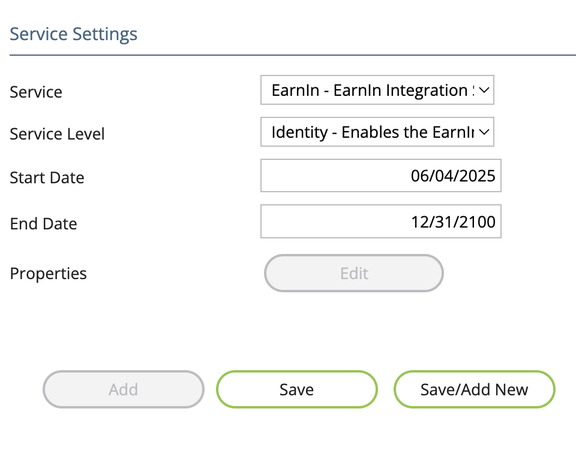
If you need to disable the migration and allow employees to resume using the old Kiosk site, simply remove the EarnIn service from the company.
Employee Name Review
Review the employee names in the company and make sure they contain only allowed characters. Employees with unallowed characters must be updated before they attempt to log in and migrate their account.
Allowed:
- Alphabetical letters (A–Z)
- Spaces (e.g., "Mary Jane")
- Hyphens (e.g., "Anne-Marie")
- Apostrophes (e.g., "O'Connor")
Not allowed:
- Numbers
- Emoji
- Special symbols (@, #, %, $, _, etc.)
- Names ending with a hyphen or apostrophe
- Repeated separators (double hyphens, double apostrophes, double spaces)
- Non-English scripts (Hindi, Tamil, Cyrillic, Chinese, etc.)
Direct Deposit Review
The EarnIn app offers a better user experience by simplifying direct deposit setup so users are not subject to confusion over the existing "remainder of net" calculations in current RPO/ESS. Users will be able to see their deposits equal 100% by moving toward the "net deposit" calculation method.
EarnIn provides the scripts below to identify employees who will need to be updated:
1. A setup with 'Flat -' which will be deprecated
SELECT E.co, E.id, E.sequence, E.checking, E.amountCode, E.amount, E.startDate, E.endDate
FROM EDirDep E
WHERE E.endDate > GETDATE()
AND EXISTS
  (SELECT 1 FROM EDirDep D
   WHERE D.endDate > GETDATE()
   AND D.co = E.co
   AND D.id = E.id
   AND D.amountCode = 'Flat-' AND D.amount <> '0.00')
ORDER BY E.co, E.id, E.sequence
2. A mixed setup of 'Flat' and '%'
SELECT E.co, E.id, E.sequence, E.checking, E.amountCode, E.amount, E.startDate, E.endDate
FROM EDirDep E
WHERE E.endDate > GETDATE()
AND EXISTS
  (SELECT 1 FROM EDirDep D
   WHERE D.endDate > GETDATE()
   AND D.co = E.co
   AND D.id = E.id
   AND (ISNULL(D.amountCode, '') = '' OR D.amountCode = 'Flat'))
AND EXISTS
  (SELECT 1 FROM EDirDep D
   WHERE D.endDate > GETDATE()
   AND D.co = E.co
   AND D.id = E.id
   AND D.amountCode = '%' AND D.amount < '100.00')
ORDER BY E.co, E.id, E.sequence
Allowed and disallowed direct deposit combinations:
Flat / Flat / 100%is allowed.% / %or any combination of%is allowed.Flat / % / Flatis not allowed.
Employees with these setups will need to be updated (by the service bureau and
employer) prior to migrating employees to the EarnIn app. EarnIn will take
setups of %, %, % and convert them in ReadyPay to meet the "remainder of net"
calculation.
Questions?
Contact your Payroll Service Provider.