Adding Top Level Domain (TLD) Extensions
The internet is ever changing and new top level extensions (.com, .net, etc.) are created frequently. ReadyPay Online (RPO) requires a manual update to ensure that these are recognized as safe TLDs and allowed for email address input.
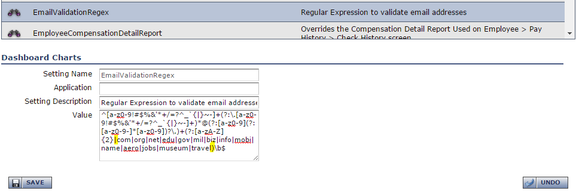
Should you need to add any extensions, go to the AppSettings table in
your RPO database or in RPO under System / Application Settings,
and find Setting Name EmailValidationRegex. Place any new extensions
in the bracketed list (highlighted below) in the Value field. Be sure
to add an additional pipe | after each entry.