JobTarget Integration Setup
JobTarget Integration — Database Setup
ReadyPay Online (RPO) supports integration with JobTarget that allows for posting job openings from the Applicant Tracking module to over 25,000 job boards. Clients using this integration are billed directly by JobTarget for each job board posting.
Before these capabilities can be used, JobTarget will provide a custom Client ID and Client Secret for each service bureau. EarnIn Payroll will provide this information, along with the JobTarget API URL, in a SQL to be run against the service bureau RPO database.
Before this setup can begin, the service bureau must receive and update
AppSettings for JobTargetClientID and JobTargetClientSecret via SQL
query.
Company Setup
Company Contact
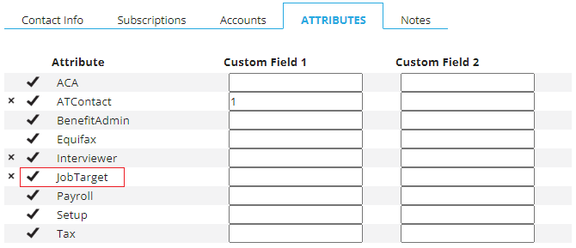
In order to post jobs through JobTarget, each client must have a JobTarget account created through the integration. The first step in creating an account is to add the JobTarget Attribute to exactly ONE contact on the Company | Master Company Setup | Company Contacts page. To do this:
- Select the contact you want to update.
- Click on the Attributes sub-tab.
- Click the check mark to the left of JobTarget.
JobTarget uses the contact's email address as their login. Email addresses must be unique. End clients with multiple company codes must have a different contact email for each company code.
When the company contact email address changes, you must contact JobTarget Support with the JobTarget CompanyID, UserID, and contact's new email address and ask them to update the user's email address.
Adding the JobTarget Service
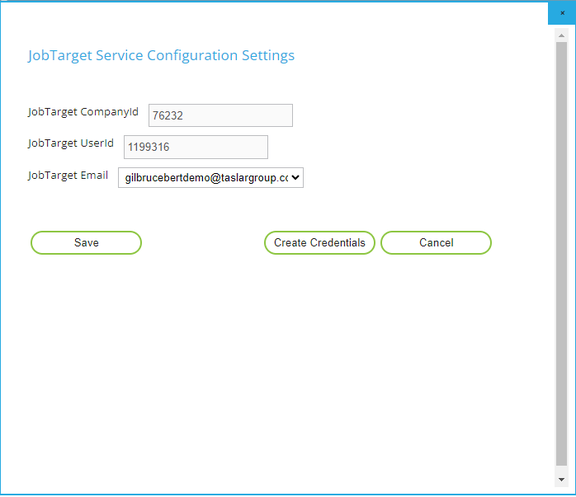
In Company | Master Company Setup | Status & Services on RPO, add the JobTarget Service and set the Service Level to FULL. Click SAVE.
Then click the Edit button on the Service. In the properties window that appears, select the JobTarget Email address of the Company Contact from the previous step above and click the Create Credentials button. In just a few seconds, the JobTarget CompanyId and UserId fields will populate. This establishes the client's JobTarget account and provides the necessary options for sending job postings through JobTarget.
Posting Jobs Through JobTarget
Attached to this article are UserGuide and FAQ documents explaining how to post jobs using RPO's Applicant Tracking module and other useful information relevant to the client experience.
The Partner Enablement Deck provides details of the JobTarget product offerings to assist service bureau sales teams in marketing this integration as a companion to the Applicant Tracking module.
Questions?
Contact your Payroll Service Provider.