E-Comp Integration Setup
ReadyPay Online (RPO) now supports integration with E-Comp. The integration gives E-Comp the ability to pull payroll data automatically for workers comp premium calculations.
E-Comp does this by initiating periodic GET requests to gather payroll data directly from the custom API endpoint within RPO. This replaces the manual method of generating reports and sending them to E-Comp using their FTP upload utility.
Database Setup
Setting up the integration with E-Comp is simple. Query your RPO database to gather 3 pieces of information:
SELECT * FROM SIntegrationProvider
WHERE provider = 'E-COMP'
AND integrationType = 'Insurance'
Provide your API address and the additional items below (please copy and paste as you see below as it is case sensitive on the E-Comp side) to E-Comp so that they can update their vendor account for you (replacing the 3 highlighted values with the values you get from the SQL above):
Example API address endpoint: https://api.servicebureau.com/
{
  "grant_type": "password",
  "username": "value from SIntegrationProvider.providerSpec2",
  "password": "value from SIntegrationProvider.providerSpec3",
  "provider": "E-COMP",
  "integrationType": "Insurance",
  "apikey": "value from SIntegrationProvider.providerSpec1",
  "client_id": "Insurance"
}
Company Setup
Adding the integration is done very simply by going to Master Company Setup > Services and adding the E-Comp service (service level of Full) to the client.
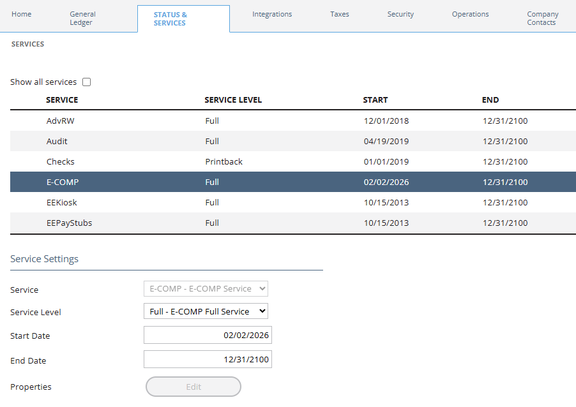
The start date on the service simply compares to the current date to determine if it is active. It is not like other services where it compares to the current check date on the company. If the date range on the service is not current, payroll data will not get generated for E-Comp during their API call.
How E-Comp Collects the Data
E-Comp will initiate a single GET request to the custom API endpoint in RPO.
get/EComp/payroll-records
They will typically initiate this call at approximately 9:30pm PST once per day. The dates they pass in to their API call represent the check date, not the process date. This means that there should be little to no risk of duplicate pay data in the event of a delete and reprocess. They do not pull data where the check date is in the future. If any payrolls change in the two-week window, they will detect that change and resubmit the payroll on their side.
When an end client has a plan renewal, E-Comp performs a manual approval for the first payroll sync after the renewal. You may need to contact E-Comp and have them retry pulling the data.
For your convenience, here is an example of the payload that gets sent to E-Comp:
{
  "FED_ID": "000000000",
  "CO_NAME": "Payroll Accounting Inc",
  "CheckDate": "20260115",
  "PayPeriodStartDate": "20251226",
  "PayPeriodEndDate": "20260109",
  "EmployeeId": "100",
  "F_NAME": "Random",
  "L_NAME": "Employee",
  "SSN": "020000000",
  "HireDate": "20230327",
  "WRKMNS_COMP_CD": "530110",
  "UCI_STATE": "WA",
  "HOURS": "88.0000",
  "WAGES": "1826.00",
  "EXCLUDED_OVERTIME": "0.00",
  "OTHER_EXEMPT": "0.00",
  "TIPS": "0.00",
  "GROSS_ADJ": "1826.00",
  "ClientId": "ABC"
},
{
  "FED_ID": "000000000",
  "CO_NAME": "Payroll Accounting Inc",
  "CheckDate": "20260115",
  "PayPeriodStartDate": "20251226",
  "PayPeriodEndDate": "20260109",
  "EmployeeId": "101",
  "F_NAME": "Another",
  "L_NAME": "Employee",
  "SSN": "030000000",
  "HireDate": "20230403",
  "WRKMNS_COMP_CD": "874201",
  "UCI_STATE": "ID",
  "HOURS": "0.0000",
  "WAGES": "3478.13",
  "EXCLUDED_OVERTIME": "0.00",
  "OTHER_EXEMPT": "0.00",
  "TIPS": "0.00",
  "GROSS_ADJ": "3478.13"
}
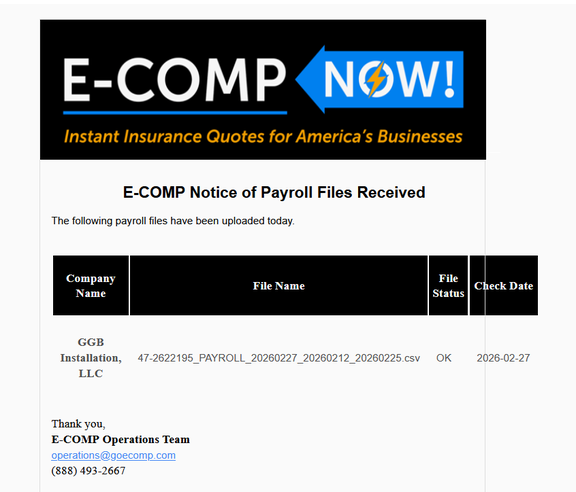
Each day E-Comp will send an email to each licensee, confirming that they have received the payroll data file. It will look similar to this:
Disconnecting a Company from E-Comp
This is a very important step that must be part of your operational procedures going forward. If a client has terminated service with you, or E-Comp, the service must be deactivated to prevent pay data from being included in payloads sent to E-Comp.
To do this you can simply end date the service using a date that reflects the day after their last check date. That way the last check date will be included in that evening's GET request.
Troubleshooting the E-Comp Integration
The E-Comp service enables RPO to act as a listener that responds to data pull requests from E-Comp. As such, you must contact E-Comp if any issues arise. No activity is recorded in ReadyPay Online's integration logs.
Questions?
Contact your Payroll Service Provider.