Insurance Bulk Enrollment
Date: 2019-11-15
Applies to: ReadyPay Online version 1.5.0.0 (or higher)
Insurance Bulk Enrollment
The Bulk Enrollment page in Company Benefits & Insurance provides users with a more efficient means of adding insurance plans to employees. By selecting a specific Insurance Plan and by using the available filtering, you may add coverage to many employees at once.

Once employees are appearing in the grid, you may click on a row(s) to highlight them for coverage to be added. They will appear in dark green once selected. You should select all employees sharing the same Coverage Level to be applied.
Employees that are currently enrolled in the selected plan will show up with a lighter green background and also show their Plan Start and End Dates and Coverage Levels. Terminated employees will show up with a red background.
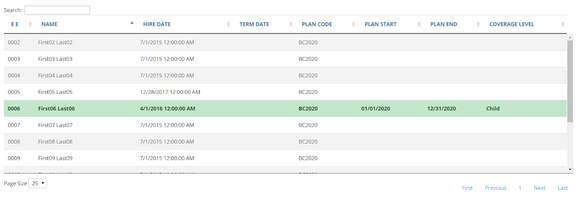
Once the employees are selected, selecting a Coverage Level from the dropdown below will enable the 'Apply To Selection' button. The Plan dates will be defaulted to the actual Insurance plan dates but may be changed if making mid-year changes.

After applying the Plan Dates and Coverage Level, the 'Save Enrollments' button will save the records.

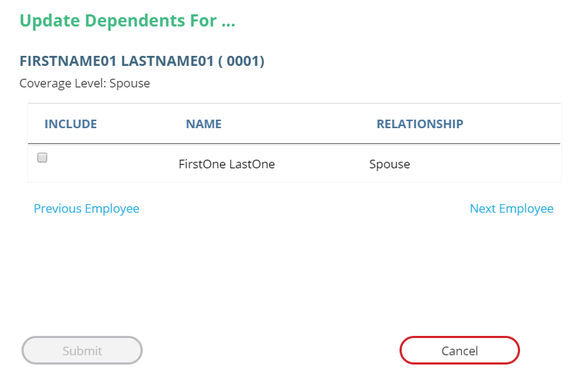
If an employee has dependents and the coverage level is not 'Employee' or 'Waived' a dialog box will appear requiring the selection of one or more dependents for the coverage for each employee that has dependents.
Once the dependents have been selected, the 'Submit' button will save the records. The grid on the page will automatically refresh to show the updates.
Questions?
Contact your Payroll Service Provider.