Job Class: RecalcTaxables
The RecalcTaxables Job Class can be run to recalculate the taxes for one employee or for an entire company. You may specify one or multiple years, and even exclude Nocalc checks so they are ignored (they will be erased otherwise).
Important caveats:
- RecalcTaxables does not look at employees across a multi co tax setup situation.
- Labor distribution records are not evaluated or changed.
- Employees who had tax code CA592 added with a start date that is retroactive to when the tax was first withheld will require an extra step, which is noted at the end of the "How it works" section of this article.
Running the RecalcTaxables Job
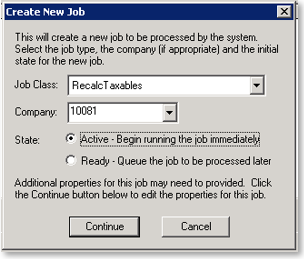
The job is run from the Job Queue page in System / Operations. Click the Add (*) button to open the Create New Job dialogue. You will first select 'RecalcTaxables' as the Job Class and then the Company code to recalculate. Then click Continue.
The Job Properties dialogue will appear. It is very important that properties are entered to ensure recalculation happens on the intended pay history.
Each of the items in the first column are case sensitive and should be entered as shown.
- Recalc — Enter '1' (required)
- year — Enter a start year of history to recalculate from (optional)
- empid — Enter a specific Employee Id to recalculate (optional)
- ExcludeNocalcs — Enter '1' to ignore Nocalc checks during the recalculation (optional)
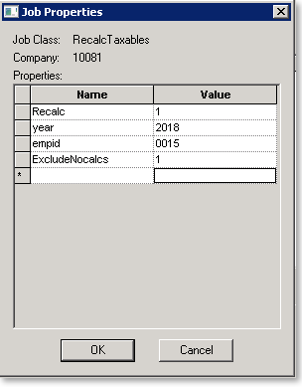
* The above example includes 'year' and 'empid' entries which are optional.
To ensure these Job Properties are used each time when running the Job Class, they may be entered as Default Properties on the System / Setup / Job Classes page.
RecalcTaxables simply does what its name implies. It recalcs the taxable wage information for the company, year and employees specified in the Job Properties.
It should only be used in situations when there is no other course of recovery when a company setup has caused incorrect taxation issues.
Ideally, the best course of action to correct taxable issues is to delete the process, make the needed changes, then reprocess the payroll.
The reason for this is that RecalcTaxables only updates EPayHistDetail records.
It does not update ELaborDist records for the company, year and employees specified in the Job. The consequence is that Labor Distribution Reports will not agree to Payroll type reports.
How it works
- Remove YTD Records for the company, year and employees specified in the Job Properties.
- The Taxables are recalculated based on the company level settings in place at the time the job is run.
- Run an Update YTD job to ensure the YTDs reflect the new amounts in EPayHistDetail.
Following is a sample Progress Log from a Recalc Taxables Job.
Ignore Nocalcs = FALSE
DPD Test 02 Mini ACA
Clearing YTDs
Recalc Taxables...
Clearing Wages Employee 1000 DPD Test 02 Mini ACA
Recalc Taxables...
Performing Recalc Employee 1000
TaxCode MED-R. Cap amt = 999999999999.000000. OvWageLimit = 0.000000
TaxCode SS-R. Cap amt = 142800.000000. OvWageLimit = 0.000000
TaxCode FUTA. Cap amt = 7000.000000. OvWageLimit = 0.000000
TaxCode NCSUI. Cap amt = 26000.000000. OvWageLimit = 0.000000
TaxCode NCSUR. Cap amt = 26000.000000. OvWageLimit = 0.000000
TaxCode MED-R. Cap amt = 999999999999.000000. OvWageLimit = 0.000000
TaxCode SS-R. Cap amt = 142800.000000. OvWageLimit = 0.000000
TaxCode FUTA. Cap amt = 7000.000000. OvWageLimit = 0.000000
TaxCode NCSUI. Cap amt = 26000.000000. OvWageLimit = 0.000000
TaxCode NCSUR. Cap amt = 26000.000000. OvWageLimit = 0.000000
Fixing up CTaxLiability
Update YTD Starting with Year : 2021
Using New Stored Procs
Rebuild all year to dates for company DPD02
- Employees who had tax code CA592 added with a start date that is retroactive to when the tax was first withheld must run the SQL script after the RecalcTaxables job has completed. Contact your Payroll Service Provider for a copy of the SQL script.
Sample results of Recalc Taxables
Company DPD02 has deduction code MEDPT set up as post tax. There is no ded type on the company level code. It should be a pre-tax 125 medical deduction.
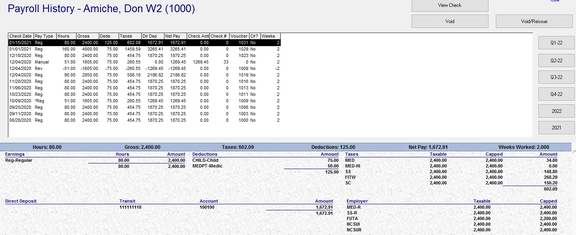
Note the taxable wages in the highlighted check. There is no taxable wage reduction for any pre-tax deductions.
To address, reset the company level deduction to have a ded type of 125.
Next, submit a RecalcTaxables job for the specific employee.
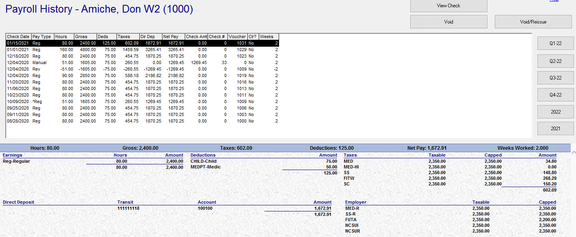
The taxable wages have changed to reflect the new 125 ded type.
Questions?
Contact your Payroll Service Provider.