EEO-1 Data Export (RP_350_1402)
Release Date: 2023-11-30
The Equal Employment Opportunity Commission (EEOC) provided updated specifications for file uploads for required employers to report data for their employees categorized by establishment and Race/Ethnicity/Gender code. Report RP_350_1402 was updated in the application to report the required information in file format to the EEOC.
Data Validation
As is the case with any reporting, data must be pulled from various areas of the system and it is extremely important that these data points are completed properly. Failure to validate data may cause employees to be left off the report/file.
-
Gender: Employees with Gender codes 'F' and 'M' entered will be reported using those federally recognized codes. Employees with other entered Gender codes (gender non-binary, refused, or other state accepted codes) will need field, EInfo.genderObserved, populated in the database with the observed Gender code 'F' or 'M'.
noteEmployees without one or both fields completed will be left off the report.
-
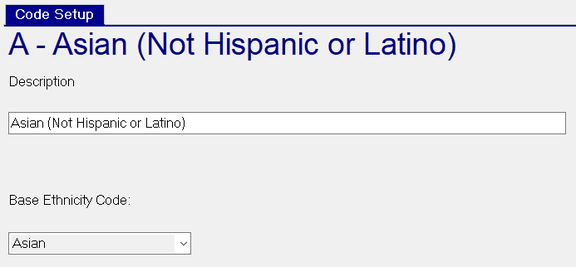
Ethnicity: Employees will need to have an Ethnicity code entered. Only those set up with a Base Type (federally recognized codes, below) will be counted in the file. To confirm setup, go to Company Setup | Miscellaneous.
| Code | Description |
|---|---|
| A | Asian |
| B | Black or African American |
| H | Hispanic or Latino |
| I | Native American or Alaska Native |
| P | Native Hawaiian or Other Pacific Islander |
| T | Two or More Races |
| W | White |
Employees with any other Ethnicity codes will need field, EInfo.ethnicityObserved, populated in the database with an Ethnicity code set with a Base Type.
Employees without one or both fields completed will be left off the report.
- EEO Class: Employees should be classified by applicable job category (codes 1-10) per EEO-1 Survey Component 1 requirements.
Additional Setup Requirements
In addition to making sure all employees have the necessary data points entered, several company level options must be completed.
-
In RPO, EEOC provided Company Number should be populated on the Company / Departments & Labor / EEOC tab.
-
In RPO, for multi-establishment (location) employers, the cost center level associated with identifying the locations should be marked as the 'Primary Work Location?' on the Company / Departments & Labor / Dept Setup page. Then, address information, EEOC Unit Number, and NAICS Code must be completed for each cost center code in that level. Mark the one cost center code as Is Headquarters that should be indicated as such in the filing.
-
For any cost center code that acts as a Federal Contractor, mark Is Fed Contractor on the same page. If their Contractor (UIE) ID is known, enter it in the EEOC Contractor ID field. Otherwise the file will display 'UNAVAILABLE'.
-
Companies should have only one Company Contact set as Is Primary Contact?. In cases where there are multiple with this assignment, only one will be pulled into the file.
Considerations When Running Report
When running the report from the Reporting section, several considerations must be made to ensure the report output contains the correct information.
-
Users must choose Override Dates (one pay period) from the period they are reporting for.
-
When running the report, the Output Format needs to be set to 'CSV'. When running the report specifically from RP, also choose File as the Destination and enter a Specific Directory path for the file to be run to. It is optional to set a filename.
-
The report is currently not set up for cross-company reporting. Those with establishments spanning multiple company codes must be merged manually.
Questions?
Contact your Payroll Service Provider.