Archiving, Restoring, and Cleanup of Old Data
The Archive process is used to make an offline copy of old data in a ReadyPay database, then delete that data. The Restore process is used to load archived data from offline storage back into a database. The Cleanup process deletes old temporary data from the database and from disk.
1. Overall Architecture
The Archive process moves data out of a ReadyPay database and into archive files on a regular basis, using whatever policies are set up at each particular site. The amount of data to archive out of the database and the frequency of archiving are determined by the site administrator and are controlled through the retention policies and the Archiver job settings. The types of tables that can be archived are hard coded in ReadyPay and cannot be changed. A site administrator may decide to archive none, some, or all of the archivable data.
The Restore process loads data from archive files in a ReadyPay database. The archive data can only be restored into the same database it was archived out of.
The Cleanup process deletes unneeded temporary data from the database, as well as cleaning temporary data stored on disk on each of the process servers. The Cleanup process is controlled entirely through the Cleanup job.
2. Archivable Data
A number of different groups of data are handled in the Archive process.
Job Queue Group
The job queue group consists of the SJob, SJobResults, and
SJobDependents tables. These tables store jobs from the job queue.
In general, job data over 90 days is unlikely to be useful except for
statistical analysis. Job data is archived before being deleted. The
age of the jobs is determined by the queued time. The minimum
retention for job data is 90 days.
Note that when archiving, any jobs in the job queue set to active that are about to be archived will be set to ready before being archived. This prevents the jobs from running if they are restored without their dependencies.
Change Log Group
The change log group consists of the LogChangesM and LogConflicts
tables. These tables store an audit trail of all data changes made in
the system. The log is used for synchronization and for the security
audit report. Any entries removed from the log cannot be sent to
remote sites, so any remote sites that have not synced since before
the retention date will fail if they try to sync. Note sync will
never synchronize sites that have not synced for over 6 months. Log
data is archived before being deleted. The age of the log entries is
determined by the actual time the entry was made. The minimum
retention for log data is 180 days.
Log data is pulled only from the LogChangesM table when archiving.
Any data that has been moved into LogChangesL by a system
administrator will NOT be archived. ReadyPay does not use the
LogChangesL table.
3. Retention Policies
The retention policy table stores a single set of retention data for each group of archivable tables. The tables must all be archived together for the process to be successful and the settings updated.
The retention data is available under System Tools > Operations > Data Archiving.
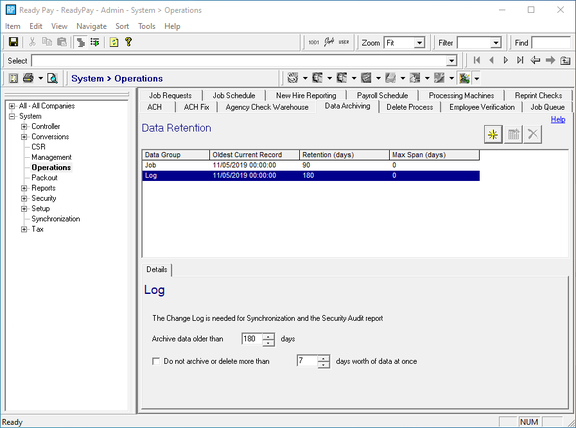
The retention data for a group of tables consists of:
- the retention date (the date of the oldest data in the tables),
- the retention days (the number of days worth of data to leave after an archive), and
- the maximum process span (the maximum number of days worth of data to process at a time).
Once it is set up, retention data cannot be removed. Removing the retention date for a group would force ReadyPay to rescan the table to find the oldest data, which may include restored data. Restored data would then be considered archivable, and the Archiver job would pick up incorrect data.
Retention Date
The date of the oldest data must be maintained to avoid re-archiving data that was restored. Any data in the database prior to the retention date is normally not modified by the archiver.
Retention Days
The number of retention days for the group determines the amount of data left in a particular group of tables after archiving. The retention days is the maximum "age" of data that can be left in the tables. The "age" of the data is determined from a particular field in each table, as discussed below. The archiver will archive records from the oldest remaining data in each table through to the desired retention date, which is the current date minus the retention days.
Maximum Process Span
The maximum process span is the maximum number of days worth of data to archive at any given time. This places an upper limit on the amount of data generated by the archiver job when a large amount of data must be archived.
In general the maximum process span should ALWAYS BE SET, to avoid archiving a large quantity of data at once. Leaving this cleared could cause all old data to be archived into a single file, which may take a long time and a lot of disk space.
4. Archiver Job
The Archiver job writes old data to disk files then deletes the data. It processes data according to the system retention tables. It processes ALL of the items set up under the retention policies, creating a single archive file for each group of data listed in the retention screen.
To run an Archiver job go to the Job Queue and add a new job using the New button in the top right corner. Select the Archiver job and leave the company code blank. There are no settings on the Archiver job.
The Archiver job can be scheduled to run at any interval using the job schedule feature of ReadyPay. A recommended practice is to run the job daily overnight to archive out one day's worth of data at a time. The Archiver always places archive files in the Archive directory as defined in the system directories.
Archiving Large Amounts of Data
When first using the archiving feature on a large database a large amount of data may need to be archived out of the system. This can take a large amount of disk space to process.
Each record being deleted from a table is logged in the SQL Server transaction log in case the procedure fails. This is a built-in feature of SQL Server and cannot be disabled. The downside is that when archiving large amounts of data, the SQL Server transaction log can grow very large. To shrink the transaction log the database must first be backed up. After backing up the transaction log, all entries backed up are freed, allowing the freed space in the transaction log to be reused. After backing up the transaction log, the transaction log can be left as is or shrunk via the SQL Server tools.
To prevent too much data from being archived at once, the Archiver job can be limited to a maximum span for any archive run. The maximum span is the maximum number of days worth of data to archive at once. After archiving the maximum span, the next archive to run will pick up where the previous job left off and archive the next span. By scheduling the archive job and the SQL Server backups carefully, an admin can prevent the SQL Server transaction log from growing too large and can ensure the archive files are a reasonable size when a large amount of data needs to be archived.
For example, when archiving a large job queue for the first time, set the archiver job to a maximum span of 7 days, then use the job scheduler to run the archiver every hour or two. By scheduling SQL Server to a transaction log (or full database) backup between each archiver job, the database should remain at a reasonable size.
5. Archive Data Files
Archive files are written to the archive path as set up in the system directories. The files are named using the following format:
Group_YYYYMMDD_YYYYMMDD.qsa
The two dates in the filename are the beginning and ending date
range of the data in the file. For example, an archive of the Job
group from 6/1/02 through 7/1/02 would be named
Job_20020601_20020701.qsa.
The files contain data in ReadyPay's internal archive format. All data in the files is compressed. The compression typically reduces archive files to approximately 15% of their original size.
6. Restore Job
The Restore job will restore the data from a single archive file into the database. Restore jobs should only be run as needed, and can be queued directly from the job queue screen. Once the Restore job has been queued the archive file to restore can be selected.
An archive file can only be restored into the same database it was created from. Archive files can NOT be shipped between databases. Archive files cannot be restored multiple times unless the data is first cleared from the system. Currently there is no way to clear restored data.
7. Cleanup Job
The Cleanup job deletes old data from the database and from disk. All settings controlling the cleanup process are supplied to the Cleanup job.
To run a Cleanup job go to the Job Queue and add a new job using the New button in the top right corner. Select the Cleanup job and leave the company code blank. The settings on the Cleanup job are then shown.
The Cleanup job can be scheduled to run at any interval using the job schedule feature of ReadyPay. A recommended practice is to run the cleanup daily overnight.
Cleaning the Precalc Group
The precalc group consists of the EPayPrecalc and
EPayPrecalcDetail tables. These tables are only used as a data
cache to speed preprocessing calculations and can be deleted at any
time. Precalc data is only deleted, not archived. The age of the
data is determined by its check date. The minimum retention for
precalc data is 30 days.
The amount of data left in the Precalc group of tables after cleanup is determined by the number of retention days for the group. This works the same way as for the archived tables.
Questions?
Contact your Payroll Service Provider.