ACH User Scripts
Overview
This article focuses on the ACH User Scripts Sub Tab found under ACH Setup. It does not address the other sub tabs used when creating or modifying an ACH Setup.
ACH User Scripts are optional. They are used to manipulate the data in various ACH Records to accommodate specific requirements of some banks, clients, and state agencies. ACH User Scripts can only be added to existing ACH Setups.
User Scripts allow you to set the values for six of the ACH fields.
The fields that can be manipulated:
Batch Header (5 record):
- Field 3 — Company Name
- Field 4 — Company Discretionary Data
- Field 5 — Company Identification
- Field 7 — Company Entry Description
- Field 8 — Company Descriptive Date
Detail Record (6 record):
- Field 7 — Individual Identification Number
- Field 8 — Individual Name
- Field 9 — Discretionary Data
Adding ACH User Scripts to RPD
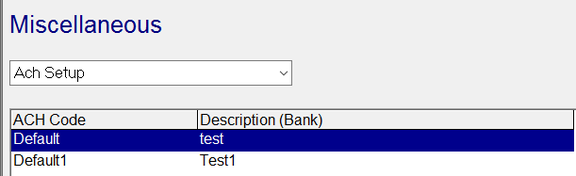
Go to System > Setup > Misc tab. Select ACH Setup from the Drop List.
Select the appropriate ACH Setup from the available setups.
Choose the User Scripts sub-tab.
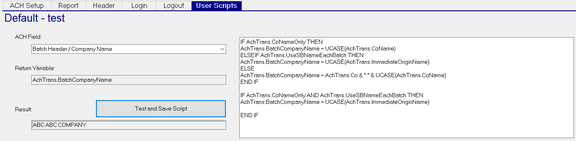
ACH Field: Use the Drop List to choose the ACH item to review.

If there is a User Script associated with the selected item, it is displayed in the large Text field to the right.
Return Variable: The entry here is based on the selected ACH Field Item.
Test and Save Script: Click this box after adding a new or altering an existing User Script.
Result: The results of the "Test and Save Script" function are displayed here.
How to Modify ACH Discretionary Fields
Variables
Variables have been created to transfer data in and out of the scripts. For each ACH discretionary field, you must define a particular return field in your script to copy the data back into RPD, known as the return variable.
The following table presents the six fields and their six corresponding return variables:
| Field | Return Variable | Max Length | Default |
|---|---|---|---|
| Batch Header / Company Name | AchTrans.BatchCompanyName | 16 | blank |
| Batch Header / Company Id | AchTrans.BatchCompanyId | 10 | blank |
| Batch Header / Company Data | AchTrans.BatchCompanyData | 20 | blank |
| Detail Record / Individual Name | AchTrans.DetailIndividualName | 22 | Name |
| Detail Record / Individual ID | AchTrans.DetailIndividualID | 15 | ID |
| Detail Record / Discretionary | AchTrans.DetailDicretionary | 2 | Discretionary |
The Max Length column indicates the maximum length that is inserted into the ACH record for that field.
The Default column indicates the value the system uses if you do not supply a script on the User Scripts tab. The default is either the value of a field listed or contains no text at all (indicated by blank).
Additional accessible data fields include:
| Field | Source | Test Value |
|---|---|---|
| Co | CTransfer | XXX |
| TransCode | CTransfer | PPD22 |
| ID | CTransfer | FITW_ |
| Name | CTransfer | Demo_Bank_Acct |
| Discretionary | CTransfer | XX |
| EntryDesc | CTransfer | TaxPayment |
| Addendum | CTransfer | TXP*012345694* |
| ProcessID | CTransfer | 2022010101 |
| AccountID | CTransfer | Sample SBTaxAcctID_ |
| AchMemo | CTransfer | Memo_ |
| EntryType | CTransfer | Misc_Pay |
| CoName | CInfo | XXX Company |
| CoEIN | CInfo | 11-11111111 |
| CoDBA | CInfo | DBAName |
| CoTaxEIN | CTax | 11-11111111 |
| ImmediateDestinationABA | SAchSetup | actual data |
| ImmediateDestinationName | SAchSetup | actual data |
| ImmediateOriginABA | SAchSetup | actual data |
| ImmediateOriginName | SAchSetup | actual data |
| ImmediateDFI | SAchSetup | actual data |
To access any of the additional fields, prepend AchTrans. to the
field name (including the dot). For example, to get the value of the
ProcessID field in the VBScript, you would use AchTrans.ProcessID,
as shown in the example line below:
AchTrans.DetailDiscretionary = AchTrans.ProcessID
In order to test your scripts when you press the Test and Save Script button on the User Scripts screen, some data needs to be passed to your script.
The Test Value column indicates what values you can use for testing or where to get them. The values noted as actual data should use the actual data you entered in your ACH setup.
Edit a Script
The VBScript you write for modifying the ACH fields can become as complex as you want. You have full access to the power of the VB scripting language. However, the end result produced by the VBScript is still only one single string that can fit into the particular field.
To modify an ACH field, select it from the ACH Field drop-down list. The corresponding VBScript for that field is shown in the text area. Use the text box to paste a new script or edit an existing script.
For example, for the DetailRecord / IndividualID field, the default script is just one line:
AchTrans.DetailIndividualID = AchTrans.ID
For that field, no other code is necessary.
You can leave a field script blank. The CreateAch job in RPD will default it.
In particular, note the following:
-
If multiple companies exist when you process a file and you need to change a discretionary field for just one company, you must keep the default conditions for the other companies.
-
In ACH file creation, the system prepends
1in the front of the company ID in record 6 position 40. It also removes any hyphen characters. The default script also prepends a1and removes the hyphens. If you create a custom VBScript for company ID, you must also add the digit1and remove hyphens, if that is the desired result. -
The VBScript for the Detail Discretionary data (record 6, positions 77–78) requires using the Individual ID, since the two values set for the discretionary are the first two digits of the ID.
-
If the Bank File Import functionality is being used, the RPD company ID needs to be in the Company Name field of the Batch Header record. Accordingly, you should use the following Batch Header / Company Name user script:
AchTrans.BatchCompanyName = achtrans.co + " " + ucase(achtrans.coname)This results in the RPD company ID, followed by a space, followed by the RPD company name (for example,
123DemoCompany).
Test the Script
When you finish editing a script, you must check it for syntax and its result.
In order to save the VBScripts to the RD database you must use the Test and Save Script button. The button does not immediately save the script to the database; instead, it saves the script to the ACH entity that is later saved when you press F11 or click the Save icon in the tool bar, or by selecting another tab.
The results you get back might not look like you expect. In order to test a script, some dummy data is passed into the environment.
Execute the Script
The scripts are executed when the CreateAch job is running.
Note the following:
- If your script fails, the CreateAch job will default to its internal value and continue.
- If your script returns a result that is too big for your fields, the job will truncate it and continue.
- If no script is found, the job will default to its internal value and continue.
Default ACH Discretionary Scripts
The scripts listed in this section are the default scripts used with RPD. If you are adding brand new ACH Setups, the default scripts stored in the database are blank because new scripts are usually added thereafter. If you wish, you can use the default scripts listed here as a starting point.
Batch Header: Company Name
The default script below populates the Company Name field — field 3 in the Batch Header record (the 5 record). The Company Name field begins in column 5 and contains a maximum of 16 characters.
This script populates the Company Name with various possibilities, based on certain conditions:
IF AchTrans.CoNameOnly THEN
    AchTrans.BatchCompanyName = UCASE(AchTrans.CoName)
ELSEIF AchTrans.UseSBNameEachBatch THEN
    AchTrans.BatchCompanyName = UCASE(AchTrans.ImmediateOriginName)
ELSE
    AchTrans.BatchCompanyName = AchTrans.Co & " " & UCASE(AchTrans.CoName)
END IF

IF AchTrans.CoNameOnly AND AchTrans.UseSBNameEachBatch THEN
    AchTrans.BatchCompanyName = UCASE(AchTrans.ImmediateOriginName)
END IF
Alternate Scripts for Batch Header: Company Name
You can replace the default, 11-line script above with any one of the alternate, 1-line scripts below. Each of these alternate scripts forces the system to populate the Company Name field with a particular value — as opposed to one of several possible values allowed in the default script.
Use the following script to force the system to use the company name:
AchTrans.BatchCompanyName = UCASE(AchTrans.CoName)
Use the following script to use the company code:
AchTrans.BatchCompanyName = UCASE(AchTrans.Co)
Use the following script to use the company EIN:
AchTrans.BatchCompanyName = Replace(AchTrans.CoEIN, "-", "")
Use the following script to use the company FEIN with a leading "1":
AchTrans.BatchCompanyName = "1" + Replace(AchTrans.CoEIN, "-", "")
Batch Header: Company ID
IF AchTrans.UseSBFedID THEN
    AchTrans.BatchCompanyID = "1" + Mid(AchTrans.ImmediateOriginABA, 2)
ELSEIF AchTrans.UseSBNameEachBatch THEN
    AchTrans.BatchCompanyID = " " + AchTrans.ImmediateOriginABA
ELSE
    AchTrans.BatchCompanyID = "1" + Replace(AchTrans.CoEIN, "-", "")
END IF

IF AchTrans.UseSBFedID AND AchTrans.UseSBNameEachBatch THEN
    AchTrans.BatchCompanyID = " " + AchTrans.ImmediateOriginABA
END IF

IF AchTrans.ForceCompanyIdChar <> "" THEN
    AchTrans.BatchCompanyID = AchTrans.ForceCompanyIdChar & Mid(AchTrans.BatchCompanyID, 2)
END IF
Batch Header: Company Data
IF AchTrans.CoNameOnly THEN
    AchTrans.BatchCompanyData = UCASE(AchTrans.Co)
ELSEIF AchTrans.UseSBNameEachBatch THEN
    AchTrans.BatchCompanyData = UCASE(AchTrans.Co) & " " & UCASE(AchTrans.CoName)
ELSE
    AchTrans.BatchCompanyData = UCASE(AchTrans.CoName)
END IF

IF AchTrans.CoNameOnly AND AchTrans.UseSBNameEachBatch THEN
    AchTrans.BatchCompanyData = UCASE(AchTrans.CoName)
END IF
Detail Record: Individual Name
AchTrans.DetailIndividualName = AchTrans.Name
Detail Record: Individual ID
AchTrans.DetailIndividualID = AchTrans.ID
Detail Record: Discretionary
AchTrans.DetailDiscretionary = AchTrans.Discretionary
Script Examples
You can use the examples below as templates for similar scripts you may want to build.
Changing a single company name when multiple companies exist on file
IF AchTrans.CoName = "SHELL Corporation" THEN
    AchTrans.BatchCompanyName = "SHE " & "SHELLOILX CORPORATION"
ELSE
    AchTrans.BatchCompanyName = AchTrans.CO & " " & AchTrans.CoName
END IF
Changing a single company data when multiple companies exist on file
IF AchTrans.CoName = "SHELL Corporation" THEN
    AchTrans.BatchCompanyData = "SHELLOIL2 CORP"
ELSE
    AchTrans.BatchCompanyData = AchTrans.CoName
END IF
Changing a single company ID when multiple companies exist on file
IF AchTrans.CoName = "SHELL Corporation" THEN
    AchTrans.BatchCompanyID = "1987654"
ELSE
    AchTrans.BatchCompanyID = AchTrans.CoEIN
END IF
Changing an individual ID for a specific agency for a specific company
IF AchTrans.CoName = "Teradyne 0001" AND AchTrans.ID = "ESSPROB1" THEN
    AchTrans.DetailIndividualID = "MANPOWER"
ELSE
    AchTrans.DetailIndividualID = AchTrans.ID
END IF
Changing an individual name for a specific agency per a specific company
IF AchTrans.CoName = "Stop-Shop Supermarket" AND AchTrans.Name = "Norfolk Probation" THEN
    AchTrans.DetailIndividualName = "8888Morris County Probation"
ELSE
    AchTrans.DetailIndividualName = AchTrans.Name
END IF
Changing discretionary data for a specific company
IF AchTrans.CoName = "Stop-Shop Supermarket" AND AchTrans.Discretionary = "NFK01" THEN
    AchTrans.DetailDiscretionary = "MMK01"
ELSE
    AchTrans.DetailDiscretionary = AchTrans.Discretionary
END IF
DBA Information
You can supply "Doing Business As" (DBA) information in discretionary
scripts using the special data field code AchTrans.CoDBA.
The AchTrans.CoDBA field pulls its information from the DBA
field under [company] > Company Maintenance > Master Company Setup >
Demographics tab.
This feature specifically meets the requirements of Nevada state unemployment ACH requirements (NVSUI).
Display Transfer Type
Use the script below to enter the actual transfer item in the 5 record. Using this script allows the client's bank statements to indicate the transfer type (Billing, Tax, Direct Deposit, and so on) instead of simply indicating "Transfer."
IF Achtrans.entryDesc = "Transfer" THEN
    AchTrans.BatchCompanyEntryDesc = AchTrans.Discretionary
ELSE
    AchTrans.BatchCompanyEntryDesc = AchTrans.entryDesc
END IF
Child Support Script to Contain Company FEIN
Batch Header: Company Data
IF Left(AchTrans.discretionary, 9) = "CS-MNSDU" AND _
   AchTrans.EntryType = "ChldSuppCTX" THEN
    AchTrans.BatchCompanyData = AchTrans.CoEIN
END IF
The example above assumes the formatting of the child support agency is nine characters in the "CS-MNSDU" format.
If your format is a different length, change the 9 to a different
number.
If your agencies are for states other than Minnesota, create multiple
scripts to cover each state and change CS-MNSDU accordingly for each
state (CS-TXLSDU for Texas, etc.).
Questions?
Contact your Payroll Service Provider.