Correct Procedure for Running the Mill Bill Report
The Mill Bill report (RP_950_5101) has recently received changes related to Webclock billing. Additional options have been added for more accurate billing statements to be provided to TASLAR.
This report is the only report that TASLAR accepts for such billing. No custom reports should be used for this purpose.
The report should be added to the System > Reports area in ReadyPay to be executed properly. It can be added to any custom folders you have within this area if you wish.
If you use the Scheduled Reports function with Client Manager Pro you can add it to the System > Reports > Scheduled folder. Further information on this can be found in the Scheduled Reports article.
By default the report will always run for the previous month at execution time. The only options that need to be overwritten are in Additional Formulas. You can alter the Output tab as you see fit depending on how you want the report to be generated. When providing it to TASLAR it should always be in PDF format.
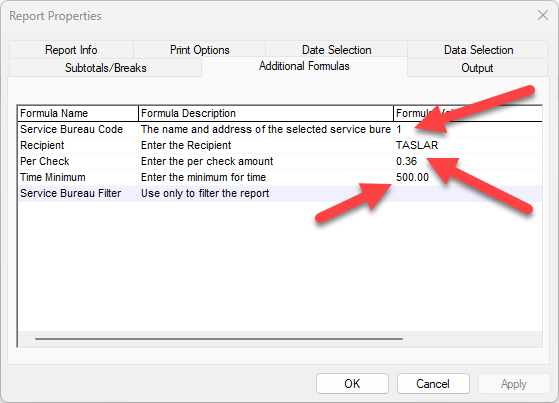
- Service Bureau Code: This field is used to populate the address of the service bureau at the top of the report. Enter your primary service bureau id number; it defaults to 1 but it may be different in your service bureau database. Check the System > Setup > SB Info tab to be sure.
- Recipient: This field populates the remit to field on the report. It defaults to TASLAR on any newly added report now but you may have a different value if the report has existed for some time. Please change it to TASLAR if this is not what you currently have specified.
- Per Check: This field determines the per check fee that you have previously negotiated with TASLAR. You will need to review your TASLAR service bureau agreement to determine your agreed upon check fee and populate this field with that value. It will default to 0.02 so it must be changed to provide accurate calculation of report totals.
- Time Minimum: This field determines the minimum Webclock fee that you have previously negotiated with TASLAR. You will need to review your TASLAR service bureau agreement to determine your agreed upon Webclock minimum fee and populate this field with that value. It will default to 500.00 so it must be changed to provide accurate calculation of report totals.
- Service Bureau Filter: This field is for informational purposes only and must not be used when generating your report for TASLAR. This field can be used ad-hoc for your own purposes to filter the report by sbGroupId. It will generate individual group check counts for other groups that you have set up under the System > Setup > SB Info tab. By entering the sbGroupId in this field, it will limit the count to only companies with that group.