Autoprocess Payrolls
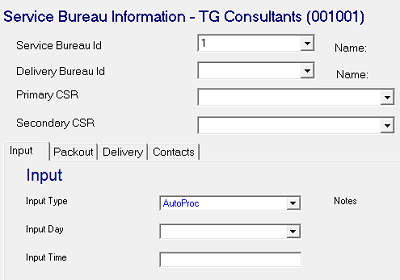
The AutoRun.Net job will automatically process payrolls set with a specific Input Type on the Company Maintenance | Master Company Setup | SB Info tab.
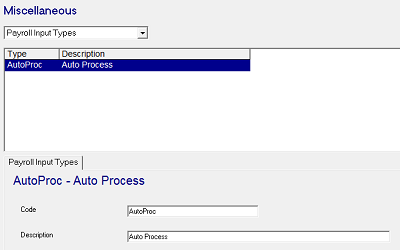
- Add a Payroll Input Type of 'AutoProc' (case sensitive) under System | Setup | Misc. You may use a different Input Type by specifying the Input Type in the Job Properties in step 2.
-
Add AutoRun.net to System | Operations | Job Schedule — set the job to run once or twice daily based on service bureau preference.
-
Set the Input Type to 'AutoProc' on any companies who should process automatically. The AutoRun.Net job will submit Start Payroll and Submit Payroll jobs for each company configured and scheduled to process on that day.
Only payrolls created through the Calendar Scheduler will process automatically.
Payrolls will be automatically run in any pre-submission status (Scheduled, Open, Closed). For companies who have been set to have payrolls submit into a request state on the Company Maintenance | Master Company Setup | Status screen, the requests will now appear in blue when they are automatically submitted for processing. Any Payroll Notes will be included with a request.