Master Company Setup: Tax Filing
The Tax Filing (Tax Filing Configuration) Tab is used to control what tasks are created when Quarter End Processing is started for the client. Tasks are entries in the various Quarter End tabs that are run to perform audits, create tax returns for various recipients, make tax payments and do electronic filing. The Tasks are created based on the setup of the company in the Master Company Setup > Taxes Tab. The Taxes Tab has a Sub Tab called Filing Methods. Instructions on which Tax Return(s) to produce and how to produce them are housed here.
Configuring the Tax Filing Configuration Tab
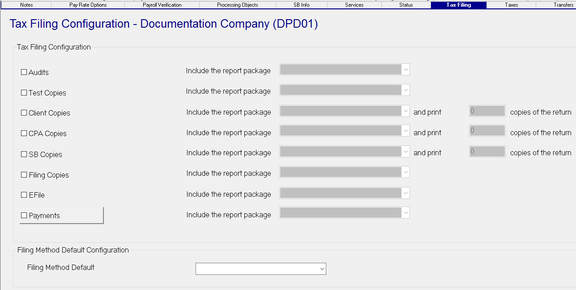
On the screen, there are Check Boxes for Audits, Test Copies, Client Copies, CPA Copies, SB copies, Filing Copies, EFile and Payments. These correspond to tabs found in System > Tax Filings.

Checking any of the boxes indicates to the system to populate tasks on those tabs.

| Field Name | Information |
|---|---|
| Audits | Audits are run to identify possible issues with the setup of a tax or possible issues with the data on the return itself. |
| Test Copies | Allows the production of a test (sample) copy of a tax return. Helpful if a tax return has had layout revisions. Allows for review prior to bulk production of live copies. |
| Client Copies | Use to produce client copies. |
| CPA Copies | Use if clients are associated with a CPA that requires copies of their Tax Return. |
| SB Copies | Use to produce client copies. |
| Filing Copies | use to produce Filing Copies where filing is done on paper. |
| EFile | Used when filing is done electronically |
| Payments | Generates the payments related to the various taxes paid with quarterlies |
| Include in report package | To the right of each entry, there is a field titled "Include the report package". This field is active only on items that have been checked. If active, use the Drop List to select the report package you wish to include. |
For information on the setup and use of Report packages,
click here.
and print 0 copies of the return: On the Client, CPA and SB Copies options, there is an additional field titled "and print 0 copies of the return". This field becomes available and is set to a value of one (1) if these items have a check mark.
Note the Dialogue Boxes displayed if you check or uncheck one of the check boxes.


Filing Method Default Configuration Section

Filing Method Default : This field is used to set the default Filing Method of the tax returns (Master Company Setup > Taxes > Filing Methods Sub Tab)when a tax code is added to the company. Select the Drop List option most consistent with how tax returns are filed by your service bureau
