Master Company Setup: Processing Objects
Processing Objects provide the ability to scan data in the system and update it as needed. They are often used to correct employee setup issues where the client has omitted data. The objective is to identify these issues/omissions and correct them before they cause issues.
For example: An employee tax code was not added to an employee. This may not be identified as an issue by the software. However, if not detected, the result is improper taxation of the employee, possible amended tax returns, etc.
A client uses Workers Comp. In order to ensure proper Worker Comp reporting, a Processing Object can identify any employee with no Worker Comp code and insert one based on the instructions in the Processing Object.
Processing objects are comprised of two components.
1. A Hook. This tells the system when in the payroll process to run the Processing Object.
The Hook refers to the Job Class in which you want the Processing Object to run.
Understanding where each Job Class is executed in the Payroll Process is critical.
2. SQL statement(s) that tell the system what to update and how to update it.
Setting Up a Processing Object
Choose the Hook from the list of Job Classes provided by the Drop List. For our example, we will use PostProcessVerify.
We use PostProcessVerify because o ur Processing Object will force all employee deductions to their home location (cc1) even if earnings are charged to other locations.
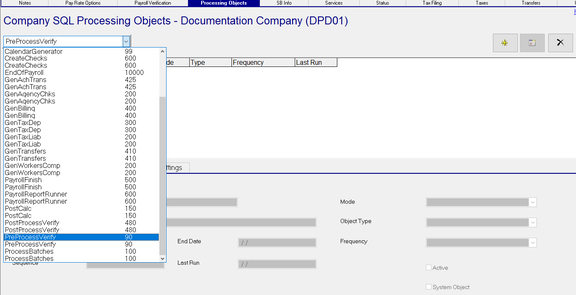
After choosing the Hook, click the New (*) Button). A Dialogue Box titled "Add new sql processing object" is displayed.

In the field next to the "Custom Object" Radio Button, enter a code for the Processing Object and Click OK.
Our code will be DedstoHome.
If you choose System Object, the Drop List is populated with a list of any existing system level Processing Objects.

You are moved to the SQL Processing Object Sub Tab.
SQL Processing Object Sub Tab
| Field Name | Information |
|---|---|
| Description | Detailed description of the Processing Object |
| Start Date | The first check date the Processing Object goes into effect. The default is the check date in the Payroll Module. |
| End Date | When the Processing Object should end. Default is 12/31/2100. |
| Sequence | A numeric value to control order of processing within the Hook |
| Last Run | Auto-populated with the check date where the processing object was last run. |
| Mode | Select the appropriate mode from the Drop List. Default is Payroll. |

Object Type : Select the appropriate Object Type from the Drop List. Default is SQL.

Application is currently not supported
| Field Name | Information |
|---|---|
| Frequency | If the Processing Object needs to be run at certain intervals (not every processing), select the Frequency from the Drop List . The Drop List contains all Frequencies for this company from Master Company Setup > Frequencies. The Default is blank (every processing). |
| Active | By Default, the Active Box is checked. Unchecking deactivated the Processing Object. |
| System Object | The Box is checked or unchecked based on your selection when creating the Processing Object. |
SQL Sub Tab
Enter the SQL needing to be executed by the Processing Object. These SQLs must be developed and tested in native SQL prior to applying to a client specific Processing Object. The SQL must contain "= [paremCo]" statement to do so. Failure to do so will result in the following Warning.

Dependent of the nature of the SQL, inclusion of a "= [paramCalendarId]" statement may be needed.
Our sample SQLs force all employee deductions to the home cc1 value, regardless of the cc1 to which they were paid.
Note the inclusion of the statement "epayhistdetail.co = [paramCo] AND epayhist.calendarId = [paramCalendarId]."
This ensures the SQL updates records for this company and prevents the sql from updating records other than those from the current processing.
These queries update epayhistdetail and elbordist records. The Hook for this Processing Object is set to PostProcessVerify.
This ensure it runs after those records are created in the ProcessBatch job(s).
Sample SQL(s)
update epayhistdetail.
set epayhistdetail.cc1 = epayhist.cc1 from epayhist
inner join epayhistdetail on epayhistdetail.co = epayhist.co and epayhist.trans = epayhistdetail.trans
where epayhistdetail.det = 'D' and epayhistdetail.co = [paramCo] AND epayhist.calendarId = [paramCalendarId]
update elabordist
set elabordist.cc1 = epayhist.cc1 from epayhist
inner join elabordist on elabordist.co = epayhist.co and epayhist.trans = elabordist.trans
where elabordist.det = 'D' and elabordist.co = [paramCo] AND epayhist.calendarId = [paramCalendarId]
Application Setting Sub Tab
Application Settings is a future enhancement and presently not supported.
Sample Processing Object SQLs
End date Employee Accruals for Termed EEs.
Set Accrual end date to employee term date. Due to the nature of this change, multiple hooks can be used.
update eaccr
set eaccr.enddate = einfo.termdate from einfo
inner join eaccr on eaccr.co = einfo.co and eaccr.id = einfo.id
where eaccr.co = [paramCo] and einfo.empstatus = 'T' and termdate is not NULL and eaccr.enddate = '2100-12-31'
Set Rate Code for earnings paid to specific CC1 values
Forces any earnings paid to the specified cc1 values to be paid at Rate 2. Due to the nature of this sql, the update needs to happen before payroll actually processes.
update epayentrydetail
set epayentrydetail.ratecode = '2'
where epayentrydetail.det = 'E' and (epayentrydetail.cc1 = 'BD' or epayentrydetail.cc1 = 'MA')
and epayentrydetail.co = [paramCo]