Master Company Setup: Frequencies
There are two type of Frequencies available in RPD/RPO: Tax Frequencies and Event Frequencies.
Tax Frequencies are built into the software
Tax Frequencies should never be modified as this will change the tax calculation.
All Tax Frequencies are single digit codes.
The One Time Frequency code of "O" is the only "non-tax single digit Frequency.
Tax Frequencies control employee level taxation. They are assigned during the new hire process. Ongoing maintenance to an existing employee's Tax Frequency is done using the Employee Maintenance > Rates Tab.
Event Frequencies are used to control when a variety of activities take place.
Event Frequencies are custom frequencies built from a Tax Frequency.
Event Frequencies should not be used as the employee's Tax Frequency.
Event Frequencies can be used with the following tabs:
Employee Maintenance
Deductions
Earnings
Accruals
Company Maintenance
Agencies
Deductions
Earnings
Master Company Setup
Billing
Defaults
Processing Objects
Adding Event Frequency Codes
Before proceeding, determine the base Frequency of the company where the new Event Frequency will be added.
This is important as it will affect the choices you make when creating the new Event Frequency.
The new frequency will be a for Monthly event that only occurs on the First Payroll of the month.
Note: My sample company is B-Weekly. The code for our sample Event Frequency will be M1.
It is for a Monthly Event that happens on the first payroll of the month.
To create the new Event Frequency, click the New (*) Button in the upper right of the Frequencies Tab.
The Dialogue Box called "Enter id for new frequency" will be displayed.
Enter you code. Keep it short. Use the Description field to explain the purpose of the Frequency. Click OK.

You are taken to the Edit Frequency Tab.
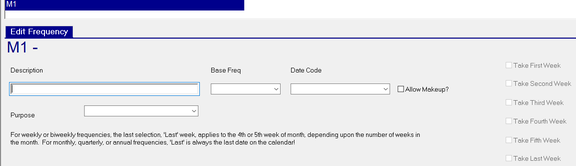
Description : A description of the Event Frequency. Our example will read "Monthly - First Payroll".

Base Freq : Provides a Drop List of all the Frequencies (Tax and Event) for that company. Use the Drop List to select the Tax Frequency that will be used as a basis for this Event Frequency. In most cases, choose the Frequency that matches the frequency of the new Event Frequency. As ours is for a Monthly event, we will select M for "Monthly - Once Per Month".

Date Code : Use the Drop List to select which date will be the basis of the Frequency.
The vast majority of Event Frequencies are based on Check Date. Select the appropriate Date Code accordingly.
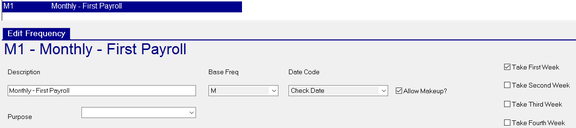
Allow Makeup? : This field works in conjunction with your selections in the far right group of Take/Allow check boxes. In our example, we have chosen "Take First Week".
Take/Allow Check Boxes : While this section has no name, the function of these fields is to tell the Frequency when to "take" or "block" the associated event. These fields will be set to "Take" or "Block" based on the Base Freq value assigned to this Event Frequency. There is a check box for each week in the calendar month. Some months have four weeks. Others have five.
Note the following when choosing weeks to Take or Exclude


Our company is bi-weekly. Consequently, the first payroll of the month, due to the check date, may fall in the first or second week of the calendar month. Use of the "Allow Makeup? option on this frequency will ensure the event happens, regardless of the physical calendar week.
Purpose : (Optional) Used to identify the use of the frequency. Select Purpose from the Drop List.

Selecting a Purpose does not prevent the Frequency from being used for other purposes.
Samples of commonly used Frequencies
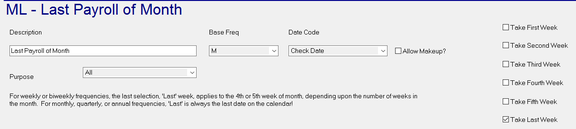
Event is Monthly - Last Payroll of the Month
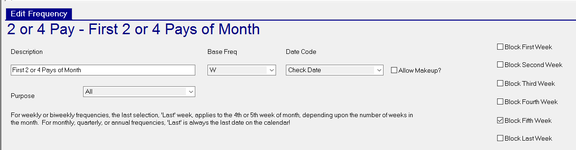
Event occurs on the first two (B-Weekly) or four (Weekly) payrolls of the month
Quarterly - First Payroll of Quarter One
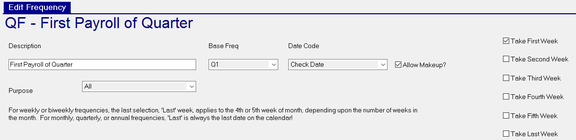
Note the value of Q1 in the Base Freq field. For other quarters, chose the appropriate option of Q2, Q3 or Q4
Annual - First Payroll of January
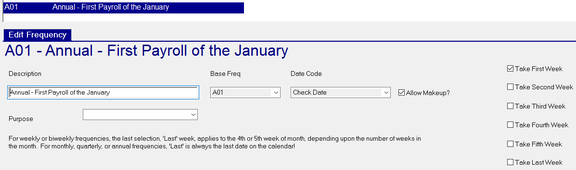
Note the value of A01 in the Base Freq field. For annual events for other months, chose the appropriate option of A02 through A12.