Kiosk Messages
Setup is under Company | Kiosk Messages
Kiosk Messages can be setup to display a notification pop-up whenever a user logs into myReadyPay.
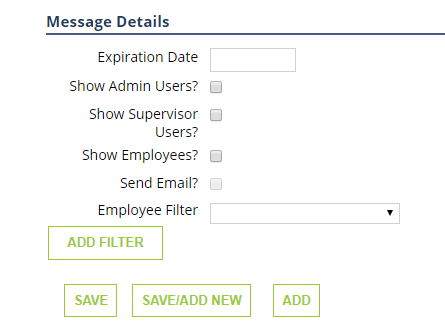
Expiration Date- Enter the date you want the message to stop popping up
Show Admin Users- Select if you want the message to be shown to Admin Users
Show Supervisor Users- Select if you want the message to be shown to Supervisor Users
Show Employees- Select if you want the message to be shown to Employees
Send Email- Select if you want an email notification to go to the Employees
Employee Filter- Select from the dropdown how you want to filter this message. IE. Active Employees, Hourly Employees, Salary Employees, Etc.
If you have company wide documents that you want employees to see, you can use Kiosk Messages as way to notify them that they have a document available to view. The messages will be available immediately and will end on the date that you enter into the Expiration Date field or when the user "Dismisses" the Message.