Employee: Personal | Additional Addresses
Use of the Additional Addresses tab is optional. It can be used to store multiple address types for an employee.
These addresses are informational. The address information on the Demographics Tab is used on paychecks/stubs and tax forms.
Working with the Additional Addresses Tab
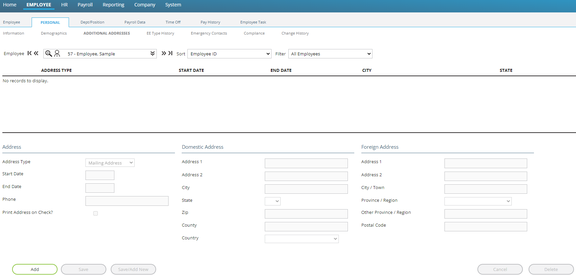
All fields on the tab are inactive until an Additional Address is added.
Click the Add Button at the bottom of the tab.

All fields on the tab are now available for input, except for those in the Foreign Address Section.
Address Section

Address Type : Select an Address Type from the Drop List on the Address Type Field.

| Field Name | Information |
|---|---|
| Start Date | Effective Date of the Additional Address. |
| End Date | Last dated the Additional Address is to be used. |
| Phone | Phone Number (if any) for the Additional Address. |
Print Address on Check? : Check to print this address on employee documents.
Domestic Address
Use the fields in this option if the address is not in a foreign country.

| Field Name | Information |
|---|---|
| Address 1 | Primary information of the address. |
| Address 2 | Typically used for additional address information (Apt #, Suite, PO Box, etc.). |
| City | City where address is located. |
| State | Use the Drop List to assign the State where the state where the address is located. |
| Zip | Zip Code for the address (Supports nnnnn or nnnnn-nnnn formats). |
| County | County where address is located. |
| Country | Country where address is located. For United States, leave blank or choose US from the Drop List. |
If the address is not in the United States, select the appropriate Country from the Drop List.
This makes the fields in the Foreign Address section available for input.
Foreign Address Section
Use this section if the address is outside of the United States.
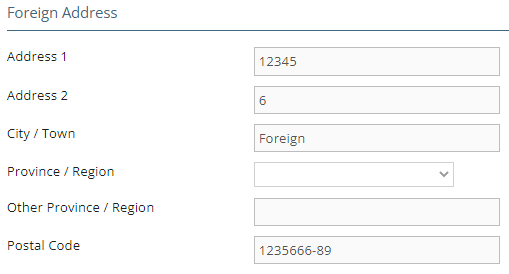
| Field Name | Information |
|---|---|
| Address 1 | Primary information of the address. |
| Address 2 | Typically used for additional address information (Apt #, Suite, PO Box, etc.). |
| City/Town | City or Town where address is located. |
| Province/Region | Currently not supported. |
| Other Province/Region | Currently not supported |
| Postal Code | Postal Code for the address |