Employee Maintenance: Reviews
The Reviews (Employee Reviews) tab is used to record information regarding an employee's performance reviews.
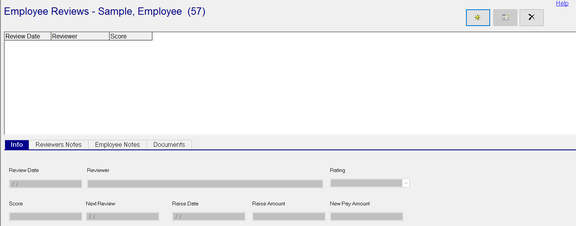
There are four sun tabs where information can be recorded.
Entry of all data is manual. There is no text editing, formatting or spell-checking functionality provided.
This tab has been in existence since the initial introduction of ReadyPay Desktop system. It is a simple method to record this type of H/R data in cases where the client does not use their own H/R product.
Recently, the Performance Management (PM) system was introduced in RPO. PM allows a client to manage the entire employee review process.
Setup
Prior to adding employee level Review information, company level Review Codes should be setup, if needed .
Review Codes are housed under the Reviews option of the Miscellaneous tac in Company Setup. Review Codes are used to populate the Rating filed on the Info Sub Tab. As with all data on all of the sub tabs. use is optional.
Adding a new Review
Click the New (*) button.
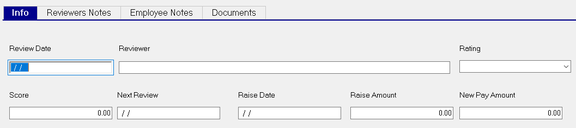
The cursor is moved to the Review Date field of the Info Sub Tab.
| Field Name | Information |
|---|---|
| Review Date | Date of the review |
| Reviewer | Enter the name of the party conducting the review |
| Rating | Choose a Rating Code from the Drop List (if populated) |
| Score | Enter the numeric rating score (if applicable |
Next Review : Enter the date of the next review
| Field Name | Information |
|---|---|
| Raise Date | Date of the Raise associated with this review (if any). |
| Raise Amount | Amount of the raise associated with this review. |
| New Pay Amount | Pay amount after including Raise amount |
Note: Raise Date, Raise Amount and New Pay Amount are informational. They do not affect how much the employee is paid. The employee's rate must be updated on the Employee Rates tab.
Reviewers Notes Sub Tab (Optional)

Note Text: Enter the Reviewers comments from the review. The field is free form with no spell check or text formatting options.
Employee Notes (Optional)

Note Text: Enter the Employee's comments from the review. The field is free form with no spell check or text formatting options.
Documents Sub Tab

Click the New (*) Button to attach a document to this review.
You can attach as many documents as needed.
A File Explorer window is opened. Locate and click on the document to attach. Click Open
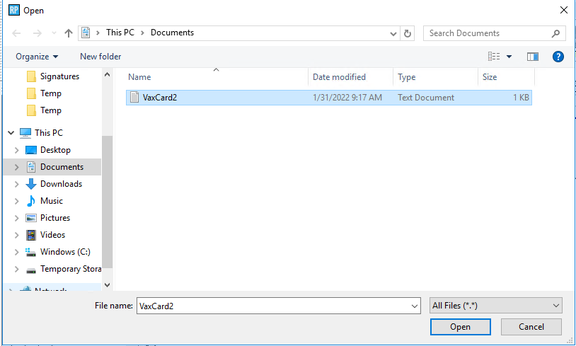
A line is added to the grid.
Code : An identifier in a format of mmddn. mm is the month of the review. dd is the day of the review. n is the sequence number of the attached document. The Sequence number is incremented by one as a new document is attached.


Notes : Click the Edit Notes field to display an Edit Notes Tax Box. Use this box to provide information about the document attached to this review.

Load/Update : Use this option to attach a new version of the attached document. Click on the field. A message indicting a document is already attached. Click Yes to replace the existing attachment. A File Explorer window will open. Find and select the new version of the document.
View : Click View to display the attached document.