Employee Maintenance: Prev Empl
The Prev Empl (Prev Employment) tab is used to record an employee's previous employment history. Use of the tab is optional. Prev Empl does not affect any payroll calculations. Data stored on this tab is strictly informational.
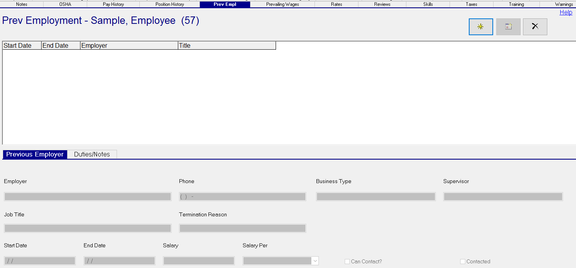
Adding a new Prev Employment record
Click the New (*) Button
The cursor is moved to the Employer field on the Previous Employer Sub Tab
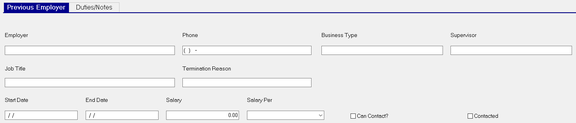
| Field Name | Information |
|---|---|
| Employer | Name of the employee's former employer. |
| Phone | Former employer's phone number. |
| Business Type | Type of business of former employer. |
| Supervisor | Name of Supervisor at former employer. |
| Job Title | Job Title at former employer |
| Termination Reason | Reason employee left former employee |
| Start Date | Start Date at former employer |
| End Date | Last date of employment at former employer. |
| Salary | Salary information from former employer. |
| Salary Per | Use the Drop List to define the time period represented by the salary (if applicable). |
Can Contact? Indicates if employee has authorized that the current employer can speak to prior employer.
Contacted : Check the box if prior employer has been contacted,
Duties/Notes Sub Tab
Use the Duties/Notes Sub Tab to provide additional information regarding the employee's position at the previous employer.

Prev Empl Duties : Use the freeform text box to describe the employee's job duties at the previous employer.
Prev Empl Notes : Use the freeform text box to record additional information about the employee at the previous employer.
Additional Information
All fields on both sub tabs are free form text fields (except for the date and phone fields). There is no spell checking or text formatting options provided.
All fields on both sub tabs are optional.
The New Version (Calendar Icon) is not functional on this tab.
Clicking the Delete (X) button will cause the display of the following box.

Click Yes to delete the record.
Reporting on Previous Employer information is available using the Employee PreviousEmployers
Report Type in Report Writer.