Employee Maintenance: Emergency
The Emergency Tab is used to store information about whom to contact in the event of an emergency with the employee.
Use of this tab is optional.
Most fields are free form text fields.
The Home, Work and Cell Phone fields, however, are formatted as phone numbers
The State field is a system provided Drop List.
Adding a new Emergency Contact
Click the New (*) Button to add a new emergency Contact.
The cursor is moved to the Name field of the Emergency Sub Tab
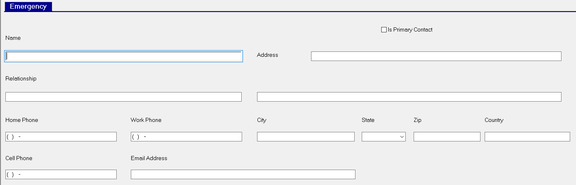
| Field Name | Information |
|---|---|
| Is Primary Contact | Check if this contact should be contacted first in the case of an emergency. |
| Name | The name of the Emergency contact. |
| Relationship | The relationship of the emergency contact to the employee. |
| Home Phone | Home Phone of the Emergency Contact. |
| Work Phone | Work Phone of the Emergency Contact. |
| Cell Phone | Cell Phone of the Emergency Contact. |
| Email Address | Email Address of the Emergency Contact |
| Address | Address of the Emergency Contact. Use the blank field below for additional address information. |
| City | City of residence for the Emergency Contact. |
| State | Stat of residence for the Emergency Contact. |
| Zip | Zip Code of residence for the Emergency Contact. |
| Country | County of residence for the Emergency Contact. |
Additional Information
1. The New Version button is not active on the tab.
2. Use the Delete (X) button to remove an existing Emergency Contact.
The following Dialogue Box will appear after clicking the Delete (X) Button.

Click Yes to complete the deletion.
3. Use the Employee Emergency Contacts Report Type in Report Writer to report the data in Emergency Contacts.
