Employee Maintenance: Dir Dep (Direct Deposit)
Use the Dir Dep (Direct Deposits) Tab to manage the direct deposits for the employee.
There are a number of options available in the setup of Direct Deposits that provide the employee the ability to direct funds from their pay to a number of bank accounts.
When setting up direct deposits, obtain the needed information from a VOIDED check for the account. Do not use deposit slips as the information found there may be invalid for direct deposit setup.
Note: The logic of how you define direct deposit records for employees with multiple accounts changed beginning with ReadyPay version 3.72.0.14. A FAQ section on these changes has been added to the end of this article.
Description of Terms
| Field Name | Information |
|---|---|
| ABA Routing | A n ABA routing transit number is a nine-digit code printed on the bottom of checks to identify the financial institution on which it was drawn. The American Bankers Association developed the system in 1910 to facilitate the sorting, bundling, and delivering of paper checks to the drawer's bank for debit to the drawer's account. |
| Full Deposit | Either the entire Net of the employee's pay or the remaining net after all partial deposits have been made. See "Primary Direct Deposit Account". |
| International Bank Account Number (IBAN) | An IBAN, or international bank account number, is a standard international numbering system developed to identify an overseas bank account. The number starts with a two-digit country code, then two numbers, followed by several more alphanumeric characters. Note that an IBAN does not replace a bank's own account numbering, as it’s only meant to provide additional information that helps in identifying overseas payments. |
| Net | Amount of the employee's pay after taxes and deductions. |
| Partial Deposit | Refers to when part of the employee net is paid via direct deposit. One net pay may be sent out as multiple partial deposits. See "Secondary Direct Deposit Account". |
| Prenote | Prenote stands for “pre-notification.” A prenote is a zero-dollar (or other currency) test . It is done to validate the banking information that was submitted by the employee. Before a Direct Deposit request can be fully authorized, a prenote must be sent and verified. |
| Primary Direct Deposit Account | Refers to an employee's active direct deposit account with the highest sequence number that uses the Amount Code "%" and the Amount field is "100.00". |
| Remaining Net | A function of the system for dealing with multiple direct deposits on an employee. As direct deposits are deducted, the system reduces the net by the amount of the first direct deposit to determine Remaining Net. |
The Remaining Net is then considered when calculating the next direct deposit. Based on the settings on the direct deposit being processed, the system uses remaining net to determine if sufficient funds exist to create the direct deposit. If so, the system continues on to the next direct deposit. If there is insufficient funds for a direct deposit to be taken, any remaining direct deposits are bypassed.
Secondary Direct Deposit Account: Refers to when part of the employee's net pay is paid via direct deposit. Secondary direct deposit accounts can either be a flat amount or a percentage of their net pay. When an employee has multiple secondary direct deposit accounts, they must all use the same amount code. An employee's Primary and Secondary direct deposit accounts can use different amount codes.
Adding a New Direct Deposit
Click the New (*) Button to initiate the process.
The cursor is moved to the Priority Field on the Direct Deposits Sub Tab.
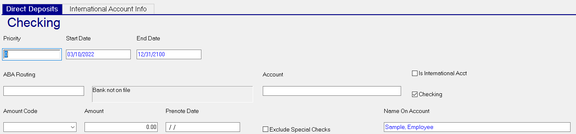
Priority : A number from 0 to 99 that determines the order in which Direct Deposits are taken. An entry of 0 (zero) will happen first. An entry of 1 will be taken after an entry of 0 and before any entry of 2 through 99, and so on. Employees with multiple direct deposits are to have the records numbered in ascending priority order.
New: Primary Accounts (i.e., the direct deposit for the entire net, or the last in a sequence of multiple partial direct
deposits ) must use a Priority of 99. Secondary Accounts use a priority of 0 to 98.
| Field Name | Information |
|---|---|
| Start Date | Defaults to the check date in Payroll. Chande as appropriate |
| End Date | Default is 12/31/2100. Change as appropriate. |
| ABA Routing | The ABA Routing Number from the voided check. |
| Bank not on file field | There is a list of Banks stored in the Banks tab under System > Setup. If the entered ABA Routing Number is not in that list, the field will read "Bank not on file". If the entered ABA Routing Number matches an entry on the Banks tab, the name of the bank will be displayed in that field. |

Additionally, the Bank Name is displayed at the top of the Direct Deposits sub tab.

| Field Name | Information |
|---|---|
| Account | The account number from the voided check. |
| Is International Acct | Check if the bank account is from a foreign country. |
| Checking | Check if the direct deposit is to a checking account. |
| Amount Code | Select the appropriate option from the Drop List to define the type of Direct Deposit. |
-
New: Primary Accounts can use either the "%" or the "Flat" amount code.
-
New: Secondary Accounts can use either the "%" or the "Flat" amount code with the following caveats. The Amount Code of an employee's Secondary Account(s) can be different than the Amount Code of their Primary Account. When an employee has multiple Secondary Accounts, they must all use the same amount code.

-
Use blank or Flat if the Direct Deposit is a flat amount
-
Use % if the Direct Deposit is a Percentage of Net. Remember the difference between Net and Remaining Net.
-
Flat- Option (deprecated): Uses the value in the amount field as a direct deposit and any remaining net goes to a paper check. New: This option was removed in ReadyPay Online version 1.39.0.1, and will be removed in a future release of ReadyPay. Existing records using this option will continue to work. However, you will not be able to select this option when adding a new record.
Amount : Enter an amount that is proper to the setting in the amount code field.
Prenote Date ; Leave this field blank if you want the new direct deposit to go through the prenote process. If left blank, the date will be populated during payroll processing with the check date of that processing. To bypass the Prenote process, enter a date that is in the past more days than the number of days setup in the Employee Prenote Days field in the Defaults Tab in Master Company Setup.
| Field Name | Information |
|---|---|
| Note. | ReadyPay automatically creates a prenote record on the first check the employee is paid after the Direct Deposit entry becomes "Active". New employees who opt-in for direct deposit should expect to receive a live check for their first check, and direct deposit thereafter. |
| Exclude Special Checks | This direct deposit will be excluded on Paycheck Types (Company Setup > Paycheck Attributes) where the Special Payment Flag is checked. |
| Name on Account | Auto populated with the employee's name. |
International Account Info Sub Tab
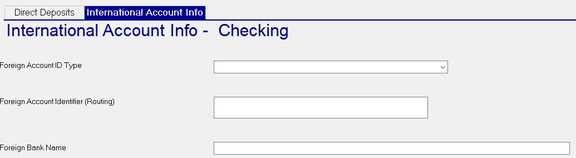
Use this Sub Tab if the Direct Deposit account is for a foreign bank.
| Field Name | Information |
|---|---|
| Foreign Account ID Type | Select the appropriate type from the provided Drop List |
| Foreign Account Identifier (Routing) | Typically, the IBAN for the account. |
| Foreign Bank Name | Name of the bank housing the account. |
Additional Information
Use a Priority of 99 on the Direct Deposit that will be for entire net, or in cases of multiple direct deposits, the direct deposit for the Remaining Net. See definition of Remaining Net. Use an amount code of % and an amount of 100.00.
If an employee wants 50% of their net to go to one account and 50% to go to another, the setup is as follows:
Assume a Net of $1000.00
Dir Dep 1: Priority of 01. Amount Code = %. Amount = 50.00.
Dir Dep 2: Priority of 99. Amount Code = %. Amount = 100.00.
In Dir Dep 1, we take 50% of net or $500.00. Remaining Net is recalculated and now is $500.00.
In Dir Dep2, we take 100% of the new Remaining Net, or $500.00.
If the remaining net is such that the Direct Deposit cannot be created, the system stops creating direct deposits for the employee. This typically happens in cases where the direct deposit is setup with a flat amount.
Example: Direct Deposit 1 is a for flat $500.00. Direct Deposit 2 is for 100% of remaining net.
The employee is paid a $250.00 Bonus. The net is $175.00.
As the remaining net is less than the flat amount of $500.00 from Direct Deposit 1, the system stops and creates no direct deposits. It does not skip Direct Deposit 1 and attempt Direct Deposit 2.
New: FAQ
-
I have an employee with a Primary Account, but the priority isn't 99. Do I have to change the priority? No. An employee's Primary Account is defined as their active direct deposit account with the highest sequence number that uses the Amount Code "%", and the Amount field is "100.00".
-
I have an employee with a Primary Account and Secondary Account(s). The Primary Account's priority isn't 99. Do I have to change it? Although we recommend changing the priority to 99, it's not required.
-
I have an employee who already has multiple Secondary Accounts. The first one has a flat $100 direct deposited to their Vacation savings account, and the second one has 5% going to their IRA. Do I have to change the Amount Code settings now? No, the direct deposit records will still work with their existing settings. However, you will be required to make the Amount Code the same for all Secondary Accounts when they want to change any one of them.
-
I have a new employee who wants to have a flat $150 direct deposited to their IRA and 100% of the rest of their check direct deposited to their checking account. Can I still do that? Yes. The employee's Primary Account can use a different Amount Code than their Secondary Account. Their Primary Account will use the "%" Amount Code (enter 100 in the Amount field). Their Secondary Account will use the "Flat" Amount Code" (enter 150.00 in the Amount field).
-
My end client called to say they cannot change an employee's direct deposit record on RPO. The employee has a new bank account, and they need to change the routing and/or account number. Once an employee's bank account is tied to one or more paychecks, the routing and account numbers become read-only. Your end client must end-date the employee's current direct deposit record and add a new one.