Employee Maintenance: Dept/Position
The Dept/Position Tab is used to assign the home location of an employee. There are additional fields used to provide information regarding the employee's work function, supervisor, etc.
The data on the tab is initially populated when the employee is added to the system.
The tab is divided into four sections that are organized by category.
Home Department/Cost Centers Section
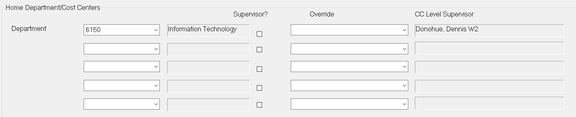
Use the fields in this section to assign the employee's primary work location (the location where they work the majority of their time.) The employee will appear in this location on employee roster type and paycheck type reports.
There are five possible levels to the company's organizational structure. There is a minimum requirement of one level. The levels are defined on the Departments Tab in Company Setup.
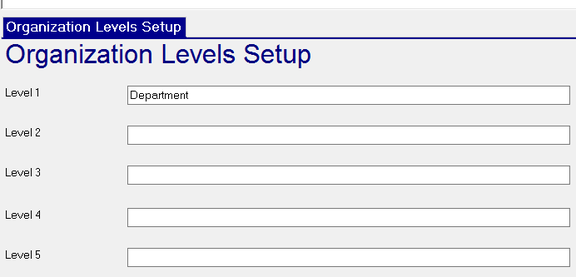
This company has three levels
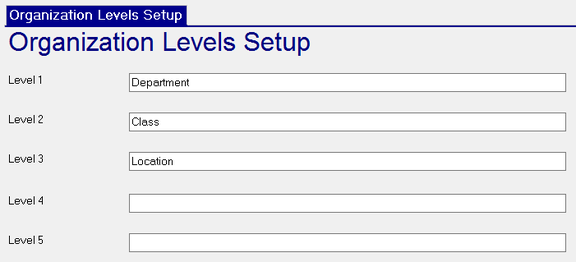
Note how the three levels are displayed under Home Department/Cost Centers

There is a Drop List for each level. These are also defined in the Departments Tab in Company Setup.
Use the Drop List to updates the employee's Home Department/Cost Center values.

Once a selection is made, other fields are completed based on the setup on the Departments Tab in Company Setup.
The name of the selected Home Department/Cost Centers entry is displayed
Supervisor? : Check to indicate that the employee is a supervisor.
Override : Use the Drop List to override the Supervisor for this selection (if any).

CC Level Supervisor : This field is completed based on the setup on the Departments Tab in Company Setup.
Transfers Section
Optional informational fields used to record information about the employee's most recent job change

Change Date : Date of job change.
Change Reason : Reason for change.
Union Affiliation Section
If applicable, use this section to record information regarding the employee's Union affiliation.


| Field Name | Information |
|---|---|
| Union | Select the appropriate Union from the available Drop List. The list of Unions is housed in the Union/Union Codes option of the Misc Tab of Company Setup. |
| Date | Membership date |
| Initiation Fees Collected | Informational. Checking this field does not cause the collection of Initiation fees. |
| Collect Union Dues | Informational. Checking this field does not cause the collection of Union Dues. |
Position Information Section
Use this section to record additional information regarding the employee's position within the company.
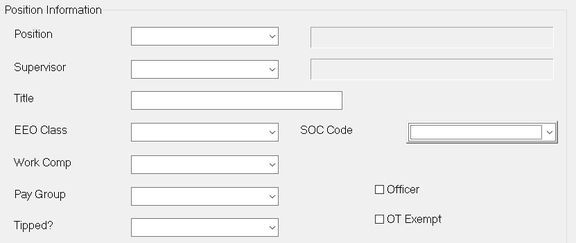
Position : Assign the employee's Position using the provided Drop List.
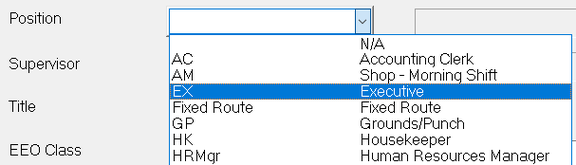
The options in this Drop List are housed in the Positions Tab in Company Setup.

| Field Name | Information |
|---|---|
| Supervisor | Using the Drop List, assign the position of the Supervisor to whom the employee will report. The list of Supervisors in housed in the Supervisor option on the Misc tab in Company Setup. |
| Title | Enter a Title in this Free form text field |
| EEO Class | Assign an EEO (Equal Employment Opportunity) Class using the system provided Drop List. |
| SOC Code | Assign an SOC (Standard Occupational Classification) Code using the system provided Drop List. |
| Work Comp | Assign a Workers Comp code to the employee using the provided Drop List. The list of Workers Comp codes is housed in the Work Comp Tab in Company Setup. |
For additional information on setting up Workers Comp
click here .
Pay Group: Select a Pay Group from the available Drop List. Pay Groups are housed in the Pay Groups option on the Misc Tab in Company Setup. Pay Groups have fallen out of fashion with the introduction of the Payroll Groups options.
Officer : Check to indicate the employee is an Officer of the company.

Tipped?: Use the Drop List to indicate the employee is a Directly or Indirectly Tipped employee. This field is optional and can be used for reporting purposes. If the client subscribes to the Tip Allocation Service, this field must be populated for that routine to function properly.
OT Exempt : Check to indicate the employee is exempt from Overtime. This setting is informational and does not affect payroll calculations.