Employee Maintenance: Dependents
The Dependents Tab is used to record information about an employee's dependents and/or Beneficiaries.
Use of this tab is optional. There are, however, certain features of the system that require Dependent information.
Company Insurance Plans and the ACA functions require that Dependents be in place to properly do their calculations.
Adding a new Dependent
Click the New (*) Button.
The Cursor automatically moves to Last Name field the Dependents Sub Tab.
Dependents Sub Tab
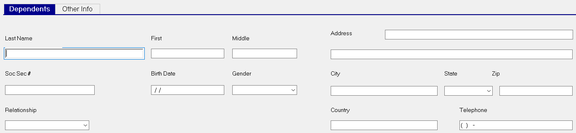
Last Name : Last Name of dependent/beneficiary.
First : First Name of dependent/beneficiary.
Middle : Middle Name of dependent/beneficiary.
Social Security # : Social Security Number of dependent/beneficiary.
| Field Name | Information |
|---|---|
| Birth Date | Birth Date of dependent/beneficiary. |
| Gender | Use the Drop List to select the gender of dependent/beneficiary. |
| Relationship | Use the Drop List to assign the relation of dependent/beneficiary to the employee. |
| Address | Address of dependent/beneficiary. |
Add'l Address ; Untitled field for additional address information of dependent/beneficiary.
| Field Name | Information |
|---|---|
| City | City of dependent/beneficiary. |
| State | Use the Drop List to assign the state of dependent/beneficiary. |
| Zip | Zip of dependent/beneficiary. |
| Country | Country of dependent/beneficiary. |
| Telephone | Telephone number of dependent/beneficiary. |
Other Info Sub Tab
The Other Info Sub Tab is used to record additional information regarding the dependent.
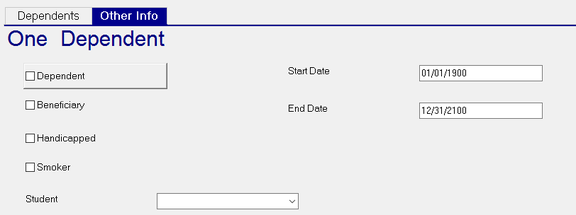
Dependent: Check this box to indicate the individual is classified as a Dependent
Beneficiary: Check this box to indicate the individual is a Beneficiary.
You must identify the individual as a Dependent or a Beneficiary . Otherwise, the following error is reported.

You can identify the individual as BOTH Dependent AND Beneficiary.
| Field Name | Information |
|---|---|
| Handicapped | Check this box to indicate the individual is handicapped. |
| Smoker | Check this bot to indicate the individual is a smoker. |
| Student | Use the Drop List to indicate the individual is either a Full Time or Part Time student. |
| Start Date | The system enters a default date of 01/01/1900 when the record is saved. Update as appropriate. |
| End Date | The system enters a default date of 12/31/2100 when the record is saved. Update as appropriate. |
Deleting a Dependent
Use the Delete (X) button to delete an existing dependent.
You cannot delete a dependent if they are in use elsewhere in the system.

You must remove the dependent from the indicated tab in order to be able to delete them.