Employee: Dept/Position | Labor Allocation
Use of this tab is optional.
Use on this tab with employees whose labor expenses need to be charged against multiple Cost Centers on a consistent basis. For example: Our Sample Employee is a manager assigned to Branch AA (Management) on his Department Tab. Sample Employee is the manager of Departments 20, 30, 40 and 50. Labor Allocations allow us to charge 25% of his labor expenses to each of the four departments for Labor reporting.
On the Payroll Register, Sample Employee's will be shown in Branch AA (his home branch).
On Labor type reports, Sample Employees labor expenses will be shown in Departments 20, 30, 40 and 50.
This tab is not used when recording one off labor charges. Those entries can be entered directly into payroll as needed.
Example: An employee form Department 20 works eight (8) hours in Department 30. An entry is payroll for 8 hours charged to Department 30 is sufficient.
Working with the Labor Allocation Tab
The upper section of the tab will display any active Labor Allocation Records.
Select an individual Labor Allocation Record to see the settings of the record at the bottom of the tab.
Labor Allocations are active if the check date in Payroll is between the Start and End Date of the record.
Use the "Show all allocations" Check Box to include inactive Labor Allocations
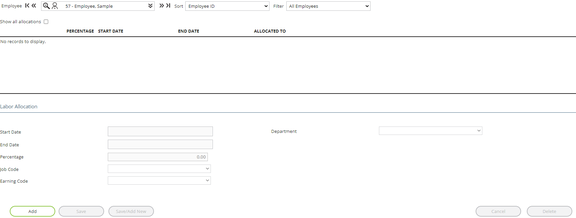
Note: In the lower right of the tab, our example shows a field called Department. Our sample company only has one level called Department on the Departments Tab in the Company Module.
A company can have up to five levels. Each level will be displayed on this area.
Sample of a company with two levels

Sample of a three-level company

Adding a new Labor Allocation Record
Click the Add Button.

The fields in the lower section of the tab become active.
The Start Date is populated with the current check date from the Payroll Module.
The End Date is populated with 12/31/2100.
| Field Name | Information |
|---|---|
| Start Date | First date when the allocation will be used. |
| End Date | Last date when the allocation will be used. |
| Percentage | Percent of wages to be allocated to the cost center. |
| Job Code | Allocate only when the selected Job Code is paid. Use the provided Drop List for selections. |

| Field Name | Information |
|---|---|
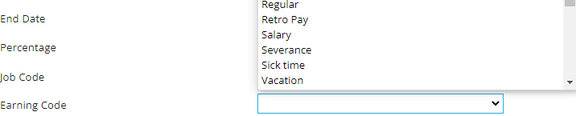
| Earning Code | Allocate only when the selected Earn Code is paid. Use the provided Drop List for selections. |
| Field Name | Information |
|---|---|
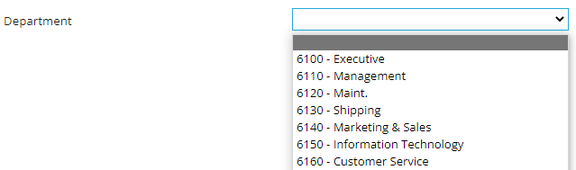
| Department | Allocate only when the selected Department is paid. Use the provided Drop List for selections. |