Company Setup: Misc | Events
The Events option is used to build a table of Event codes that can be assigned to an employee on the Employee Events Tab.
Events cannot be added to an employee until they are defined here first.
There is no limit to the number of Company Level events.
Adding a new Company Level Event Code
Click the New (*) Button. The "Enter new code" box is displayed.
Enter a short code for the event and click OK.

Logic in the system will prevent the entering of a code already in use.
The Cursor is moved to the Description field of the Code Setup Sub Tab.
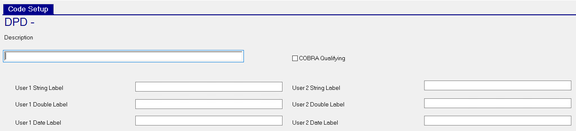
Description : Description of the Event.
COBRA Qualifying : Check if this event is COBRA Qualifying.
The remaining User fields are used to define the labels that will be used when adding this event to an employee.
If no entries are made, the field names are used as the labels on the employee level event.
You do not need to enter a label on every field, only those you will use.
The labels are all free form alphanumeric text fields.
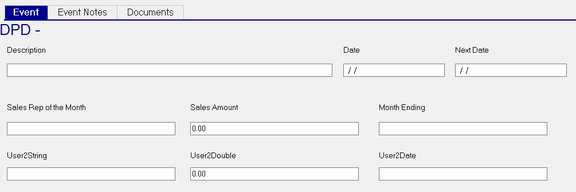
On the employee entry, the User 1 and User 2 String Label fields are text fields.
The User 1 and User 2 Double Label fields are presented as numeric fields with a default value of 0.00.
The User1 and User 2 Date Label fields are intended to record dates on the employee entry. The field on the employee event, however, is not formatted as a date.
This is a sample setup of a company level event.
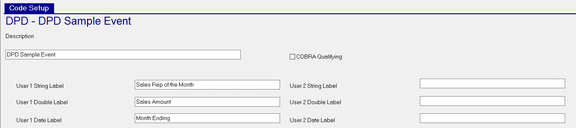
This is a sample of how the setup appears on the employee Events tab.
Additional Information
The New Version button is not active for Events.
Company level Events can be deleted if not in use elsewhere in the system.
If a Delete is attempted, an error is presented if the Event is in use.

Event reporting is available in Report Writer using the Employee Events Report Type.
