Company Setup: Misc | Certification Codes
Certification Codes are used to build a list of the various Certifications an employer wants to track that are held by their employees. This information is helpful when searching for internal candidates with certain qualifications for vacant positions.
(ie: Certified Network Engineer, C ++, Excel). Also assists in identifying that a renewal is due.
The Certifications tab in Employee Maintenance is used to record an employee's certifications.
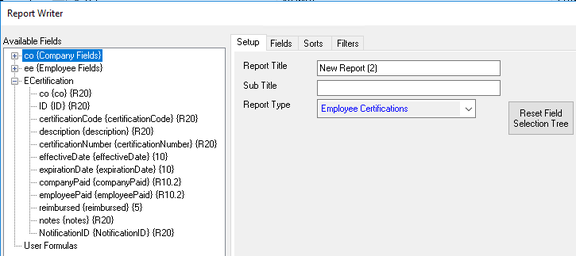
Use the Employee Certifications collection in Report Writer to provide employee Certification reporting.
Adding Certification Codes
Click the New (*) Button to display the "Enter new code" Dialogue Box.
Enter a code and click OK.

The cursor is moved to the Description Field of the Setup Sub Tab.
Description : Optional. Enter the full description of the Certification.
Option Type : This field is preset to Certification.
Save the record and repeat as needed.
Adding Certifications to an Employee
Go to the Certifications Tab in Employee Maintenance.
Click the New (*) Button.
A list of Certifications is presented.

Select an item from the list. The cursor is moved to the Code field.
Code : Use the Drop List to change the Code selection (if necessary).
Description . Optional. Will be populated with the full description from the company level Certification record (if entered)
If you change the Code using the Drop List in the Sub Tab, the Description is not updated to the description of the new code.
| Field Name | Information |
|---|---|
| Certification # | Optional. Enter the Certification number |
| Effective | Optional. Effective Date of the Certification. Today's date is used as the default. |
| Expires | Optional. Expiration Date of the Certification. |
| Paid | ER or EE: Optional. Enter the amounts (if any) paid by the employer and/or the employee for this certification. |
Reimbursed? : Optional.
Notes : Optional. Free form field for additional information regarding the employee's certification.
Certification Reporting
Asset Reporting is accomplished using the Employee Certifications Collection in Report Writer.
This collection contains all the fields found on the Employee Certifications Tab.