Company Setup: Misc | Asset Type Codes
Asset Type Codes are typically used to build a list of items provided to an employee by the company. An employee specific inventory of company assets is most helpful when an employee leaves the company. This allows the company to ensure any assets in the possession of the terminated employee are returned.
An assets inventory is helpful when projecting costs to replace a particular asset type for a section of or across the company (ie: cell phones, laptops, etc).
The Company Assets tab in Employee Maintenance is used to record any asset that an employee has in their possession.
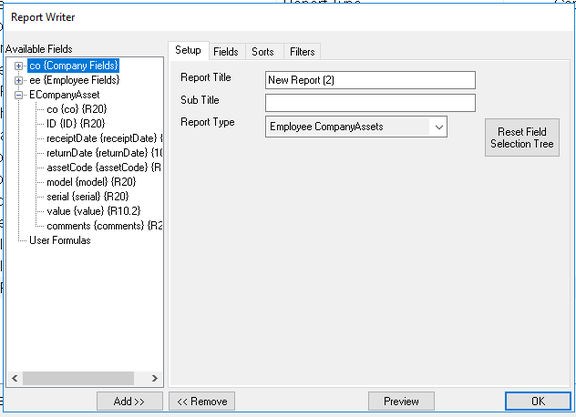
Use the Employee Company Assets collection in Report Writer to build Assets Inventory reports.
Adding a New Asset Type Code
Click the New(*) Button. The "Enter new code" Dialogue Box is displayed.
Enter a Code, then click OK.

The Cursor is moved to the Description Field.
Description: Optional. Enter a full description of the Asset.
Option Type: This field is preset to Asset.
Save the record.
Repeat as necessary.
Adding Company Assets to an Employee
Go to the Company Assets Tab in Employee Maintenance.
Click the New (*) Button.
A list of available Assets is displayed.

Select an item from the list. The cursor is moved to the Code field.
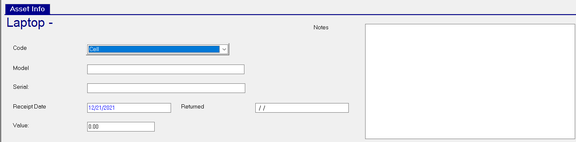
| Field Name | Information |
|---|---|
| Code | Asset code from the Company List. Even though you choose an Asset Code when adding the entry, you can change it here if needed. |
| Model | Optional: Enter any available Model Information. |
| Serial | Optional. Enter any available Serial number information. |
| Receipt Date | Optional. Date employee received the Asset. Today's date is entered as a default. |
| Returned | Optional. Date employee returned the Asset |
| Value | Optional. Estimated value of the Asset. |
Notes : Optional. Additional information regarding the Asset.
Asset Reporting
Asset Reporting is accomplished using the Employee Company Assets Collection in Report Writer.
This collection contains all the fields found on the Employee Company Assets Tab.