Company Setup: Jobs
Job Codes (also referred to as Job numbers) are used by clients to track labor expenses.
Clients who perform certain Government Contract work may need to provide Certified Reporting information on those jobs.
In order to do Job Cost tracking, the job number(s) must first exist in the Jobs (Job Codes) Tab in Company Setup.
Working with the Jobs (Job Codes) Tab
In the upper right-hand corner of the tab, the Add New, New Version and Delete Buttons are found

The New (*) Button is used to add a new Job Code to the tab.
The New Version (Calendar Icon) Button is not active on this tab.
The Delete (X) Button is used to delete a Job Code. if you attempt to delete a Job Code in use elsewhere in the system, an Object Error Dialogue Box will be displayed.

Click the Details Button to view the item preventing the deletion.

If the Job Code has been used in payroll history, it cannot be deleted.
Adding a new Job Code
Click the New (*) Button.
The "Enter new job code" Dialogue Box is displayed.
The Job Code allows up to twenty (20) characters. It can be numeric. alphabetical or a combination of the two
Enter a Job Code and click OK.

The cursor moves to the Title Field of the Job Setup Sub Tab.
Except for the initial Job Code, all fields on this sub tab are optional.
Title: Enter a Title for the job.
Description. Enter a description of the job.
Address: The street address of the job.
City: The City of the job's address.
State. The State of the job's address.
| Field Name | Information |
|---|---|
| Rate Code | Select a Rate Code from the Drop List to use when paying to this job. |
| Rate | Enter a rate amount to be paid with this job. |
| Rate + | Enter an amount to add to the employee's rate when paid with this job. |
| Rate X | Enter a Rate multiplier to the employee's rate when paid to this job. |
| Shift | Select a Shift Code from the Drop List to use when paying to this job. |
| Start Date | Start Date of the job |
| End Date | End Date of the job. |
| Certified Job | Check if this is a Certified job. |
| Active | All newly added job codes are active by default. Uncheck to indicate the job is no longer active. |
| County | The County of the job's address |
| Country | The country of the job's address |
| Project Number | The Project Number of this job. Typically used with Certified Reporting. |
Other Options Sub Tab
This Sub Tab provides access to other informational fields related to the Job Code.
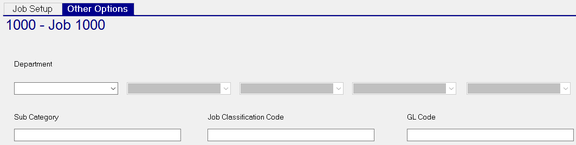
Cost Center Assignment : Dependent on the levels on the Setup Tab in Company Setup > Departments. there will be Drop Lists available for each level. The Drop List are the values from each of those levels.
Ex 1. One Level - Department

Ex 2. Three Levels- Department / Class / Location

Use the Drop List(s) to assign the desired Cost Center(s) for the job.
| Field Name | Information |
|---|---|
| Sub Category | Optional. Free form field used to facilitate reporting and General Ledger. |
| Job Classification | Optional. Free form field used to facilitate reporting and General Ledger. |
| GL Code | Optional. Free form field used to facilitate reporting and General Ledger. |