Group Term Life Setup
When the value of employer group-term life (GTL) provided to an employee exceeds $50,000, it becomes taxable compensation.
When accounting for GTL, FITW need not be deducted from the employee's check (blocked tax), but employers must always withhold social security and Medicare taxes.
To calculate the taxable compensation, take the amount of coverage and subtract $50,000 to get the excess coverage. Divide excess coverage by $1k and multiply by the value from the Cost Per $1,000 of Protection for 1 Month table in IRS Publication 15-B to get monthly cost.
Code Taxability and Setup
ReadyPay contains an Earn Type 'GTL' to properly calculate the taxability of the taxable compensation on a per paycheck basis. As mentioned above, GTL in excess of $50,000 is exempt from FITW, SITW, SS/Medicare, FUTA, and SUI. Amounts up to $50,000 are only exempt from FUTA and FITW.
GTL is handled using an Earnings code and a matching Deduction Code (In and Out).
The system adds the amount of the GTL as Taxable Earnings to the appropriate tax codes. This amount is then deducted from the check after taxes are calculated.
Deduction Code Setup
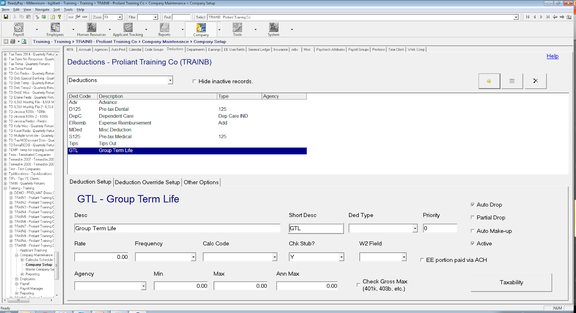
Set up the Company Level deduction code first as it is used in the company level Earnings code.
The Deduction Code should be set so it isn't easily selected for other purposes. Along with the code:
- Ded Type must be blank
- W2 Field must be blank
- Do not adjust Taxability
Earning Code Setup
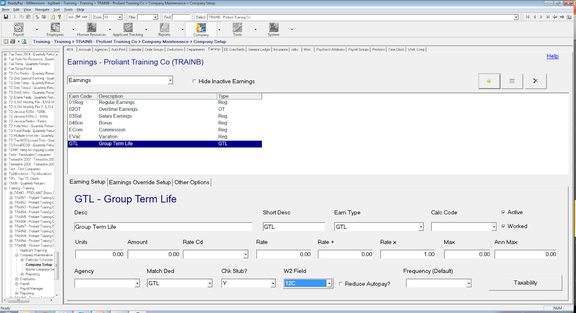
The Earning Code should be set so it isn't easily selected for other purposes.
When calculating GTL taxable compensation on an every pay period basis:
- Earn Type must be 'GTL'
- W2 Field will be set to '12C' by the Earn Type
- Enter Matching Deduction (set up in previous step)
- Rate x must be '1'
- Taxability will be set by the Earn Type — do not adjust
The earning code would then be added to each employee with GTL coverage in excess of $50,000 a year on their Earnings (Fringe) tab, as shown below. The total amount of GTL coverage should be entered in the Units field — do not reduce by $50,000. The calculated taxable amount will show in the Earnings and Deductions sections of Payroll Entry.
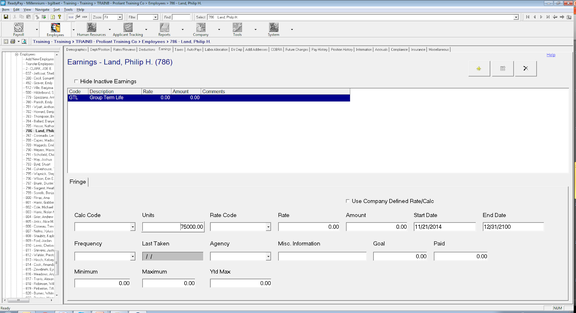
When using this method each employee needs to have their Birth Date entered on the Demographics page as the calculation depends on age brackets.
Year-End GTL
Some clients do not want GTL calculated each payroll and prefer to enter at Year-End. Also, in a new company setup, GTL amounts need to be entered as part of the Year To Date History.
Use the following steps to account for the amount of GTL taxable compensation in a single check at the end of the year:
- Add an earnings code with an Earn Type of "YearEndGTL".
- The W2 Field will be automatically set to '12C'.
- Enter Matching Deduction (set in previous step).
- Rate x must be '1'.
- Taxability is set automatically by the Earn Type.
In Payroll Entry, add the GTL earning code and enter the excess GTL value amount. Once correct, the amount will also appear in the Deductions sections of Payroll Entry, shown below.
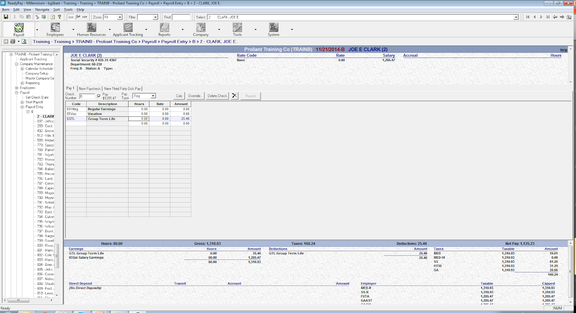
When there are no future checks this year to withhold SS/Med, you must Gross Up to cover SS/Med if the amounts are being entered in an off-cycle run with no other pay items from which to deduct the SS/Med.