Employee Paid Deductions via Direct Deposit
This article provides guidance on setting up employee deductions to be paid via ACH to third party bank accounts, such as Health Savings Accounts or Christmas clubs.
Company Setup
Transfers Tab
The first item to set up for deduction monies to be sent via ACH to a third party bank account is a record on the Company Maintenance | Master Company Setup | Transfers page. The 'DirDep-Ded' transfer must be added to account for these transactions and is set up similarly to the 'DirDep' record. Once added, separate Transfers can be added to change the movement of money between accounts for each DirDep-Ded Code. If this step is missed, ACH files will be out of balance.
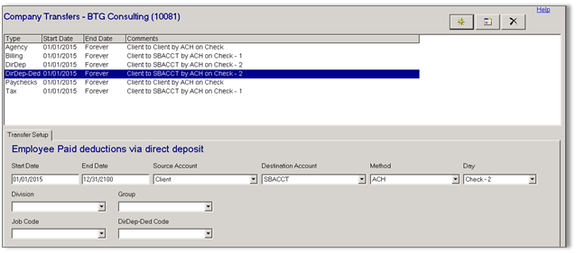
A company that is added new into ReadyPay will have the new Direct Deposit Deductions transfer. Conversions from other platforms will not have this Transfer set.
Company Agencies Tab
Next, you must add an Agency to "catch" any deductions that typically would be sent via ACH but were not sent due to prenoting (based on the company's Employee Prenote Days setting on Company Maintenance | Master Company Setup | Defaults tab). The setup of this agency very well could have third party banking information added as well for ACH if the entity receiving the funds requires it.
Company Deductions Tab
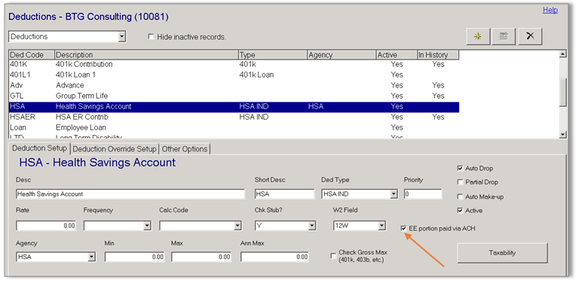
On the Company Maintenance | Company Setup | Deductions tab, choose (or add) a deduction code to be used in ACH deduction transactions and mark the 'EE portion paid via ACH' check box (as indicated by the red arrow on the screen shot below). Then select the Agency set up from the previous step and then mark the Agency check box on the Deduction Override Setup sub-tab.
Banking information is required for any employee to whom this deduction is added. The code cannot be used for standard non-ACH deductions.
Employee Setup
Employee Deductions Tab
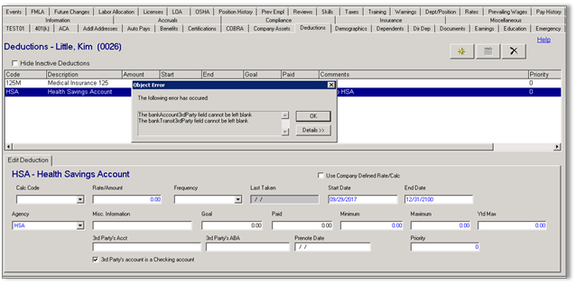
When the deduction is added to the Employee | Deductions tab, you are required to populate the 3rd Party's Acct and 3rd Party's ABA fields; they are not optional. If the account being deposited into is a checking account, mark the check box for 3rd Party's account is a Checking account. The Prenote Date field may also be populated with a date that corresponds with the company's Employee Prenote Days setting on Company Maintenance | Master Company Setup | Defaults tab to send the transaction accordingly.
The Agency, if set up as indicated in prior steps, will be displayed and act as a "catch-all" for deduction monies falling into prenote status that are not sent via ACH.
Employee Earnings Tab
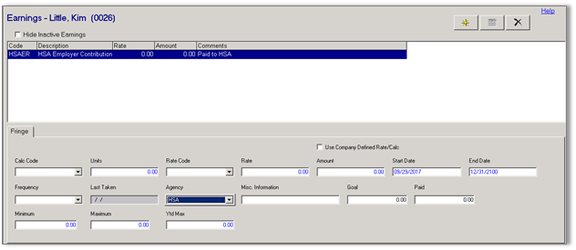
There is no option to include employer paid monies/portions via ACH in the same manner. The Agency check created in prior steps may also be used to collect employer paid monies to be sent to a third party (which in turn may be sent via ACH in the agency setup).
Payroll Processing Considerations
Adjustments to amounts for Deduction codes that are set up to be sent via ACH should always be done on the Employee | Deductions page. Entries made using a Deduction code set up for ACH in Payroll Entry will not be properly reflected in ACH files as they are not tied directly to an employee Deduction record. It is also noted that you cannot add an ACH Deduction in Payroll Entry unless it does exist as a Deduction record on the employee already.